We tested them in Hungarian so you don't have to! Here are the best AI note-takers for meetings, which can not only save you a lot of time and energy, even for free, but also help you be more efficient and attentive in meetings. Sounds good, doesn't it? Discover the leading AI note-takers in this blog post!
.png)
AI Solutions for Meeting Note-Taking Challenges
Anyone entering the workforce will inevitably attend meetings, which can sometimes be brief and to the point, while at other times they may last for hours, containing both crucial and less critical information.
According to research, in the United States, 36 to 56 million meetings occur daily, with an average employee attending 8 and a manager 12 meetings per week, not including impromptu gatherings.
Typically, we take some form of summary notes from meetings, if not a detailed memo. These notes can often be inaccurate, especially if it's one of many meetings in a day, as it's challenging to simultaneously focus on the discussion and capture all critical information. Moreover, retrieving key points from a specific meeting within your notes can be a time-consuming and frustrating process.
How Can AI Note-Taking Solutions Help?
AI-powered note-taking tools offer a solution to the problems mentioned above by recording conversations in real-time, automatically generating transcripts, and making them searchable by keywords. They are now performing increasingly well in Hungarian too, ensuring that no crucial information gets lost in the deluge of data.
Save Time and Boost Efficiency
AI-powered note-taking allows participants to fully concentrate on the topic at hand during meetings, without the distraction of taking notes.
These automatic transcripts are typically generated in moments, eliminating the need to spend hours organizing information afterward.
This can be especially useful in situations requiring rapid decision-making, or when dealing with a high volume of meetings.
Ensure Accuracy and Detail
With human handwriting or manual typing, important details can easily be missed, either because we can't keep up with fast speech or simply forget to note them. In contrast, AI-powered tools track the entire conversation and produce accurate transcripts. Our tests show they perform quite well even in Hungarian.
Some tools can even recognize and differentiate between speakers' voices, as well as highlight key keywords and topics.
This ensures that no essential information goes unrecorded.
Easy Searchability and Archiving
Even with detailed notes, finding specific information can often be a time-consuming process. AI tools offer significant assistance here, allowing you to easily review and filter transcript content based on keywords or phrases.
This feature allows you to quickly find important information without having to sift through lengthy notes. Furthermore, AI systems enable automatic archiving and organization of notes, making information easily retrievable and reusable long-term – rather than just getting lost in a forgotten folder.
These advantages make AI-powered note-taking tools almost indispensable in today's modern corporate environment, especially in areas requiring quick and accurate documentation.

Types of AI Note-Takers
AI-powered note-taking tools fall into two main categories:
Bot-based
They function via virtual assistants or bots that join the meeting, record the audio, and then automatically generate notes, even in real-time during the meeting, which participants can view and edit.
While these solutions are effective, some may find the presence of a bot in the meeting disruptive – thus, they can be as detrimental as they are helpful. If they make participants uncomfortable, they hinder smooth communication and the free sharing of opinions.
Bot-free
In contrast, bot-free AI tools record conversations on the device of the participant making the recording, and generate equally high-quality summaries, transcripts, and to-do lists after the meeting – without a visible bot present during the meeting. (In some cases, the tools themselves do not record the meeting; instead, we must upload the audio later and have the specific AI-powered tool generate notes from it.)
This promotes more natural, smoother communication – however, its drawback is that notes created this way are only accessible after the meeting, meaning participants cannot view and/or edit them in real-time.
The Great AI Note-Taker Test in 2025
The Selector marketing agency we are very open to new technologies, so after the AI image generators and video editors in recent weeks, we tested the most popular AI-powered note-takers to see how they perform in Hungarian during our various meetings.
We tested them in various situations, where several of us participated in a meeting, and they were also with us during brainstorming sessions where ideas flowed freely.
How did they perform? Let's see:
Fireflies.ai
The Fireflies is one of the most popular tools of its kind, offering both free and paid versions. It can be integrated with Zoom, Google Meet, Microsoft Teams, and many others – all without user intervention: if meetings are on your calendar, it automatically records and transcribes them. Of course, you can also manually invite Fred, the Fireflies AI bot, if you need its help during an impromptu meeting.
After every meeting, it generates concise AI summaries of what happened and specifically highlights future tasks, allowing us to quickly grasp key points without reviewing the entire transcript. With AI-powered search, we can quickly find where a topic or keyword was discussed in all previous meeting transcripts.
Furthermore, it analyzes the conversation, allowing us to track, for example, how active each participant was in the meeting, what percentage of the time they spoke, and the overall mood during the discussion.
In the free version, we can also ask our AI assistant limited questions, and it can answer based on the meetings.
The premium version offers useful integrations; Fireflies can be connected with Zapier, Slack, and CRM systems. Additionally, we can collaborate as a team, react to notes, and even analyze team members based on their meetings.
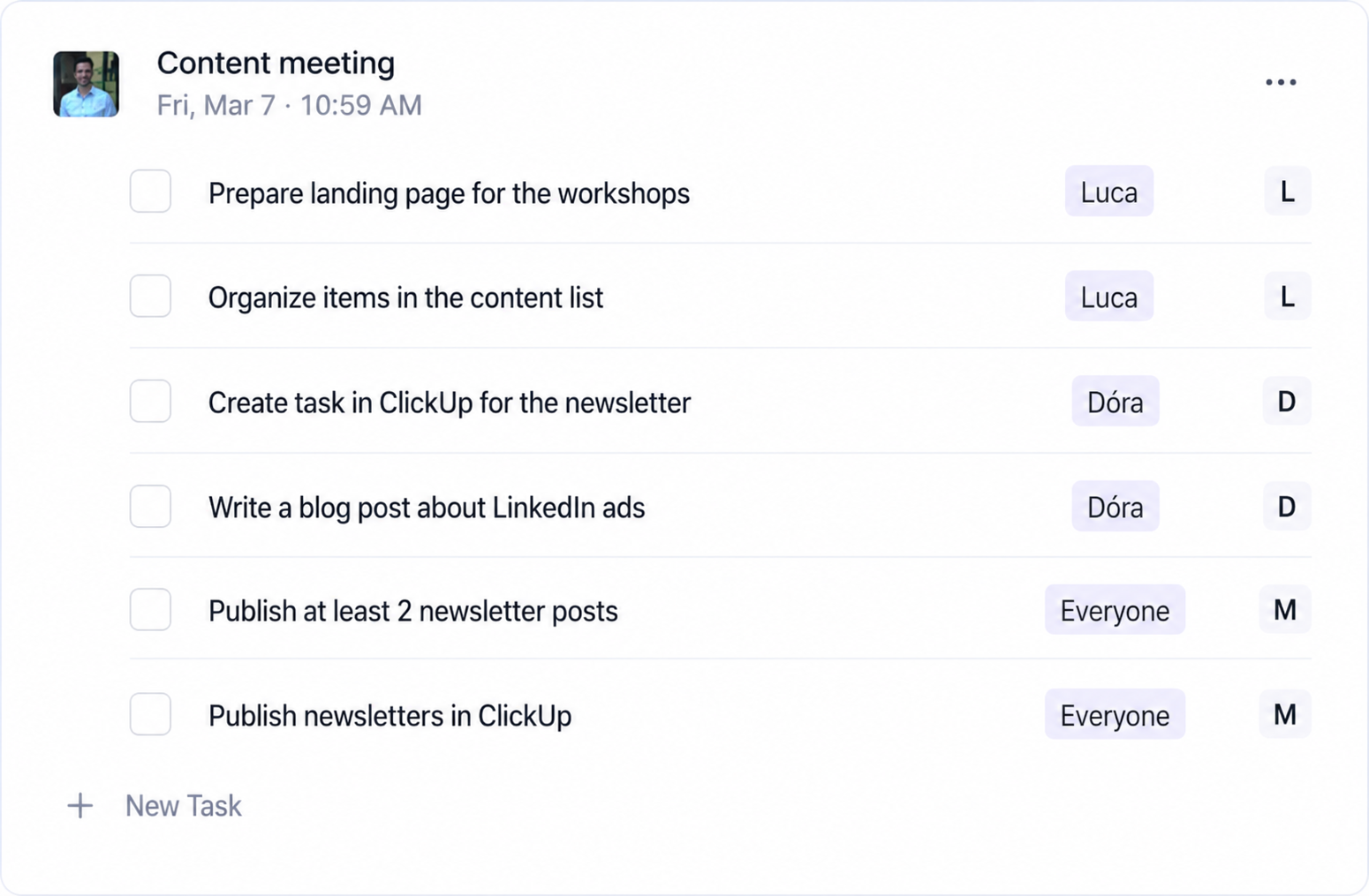
Based on our testing, Fireflies creates more concise summaries, containing the most important information. These are less detailed but logically structured. Word-for-word note-taking sometimes poses a challenge for it, but this seems to be a common issue with other tools as well. What it excels at, however, is grouping by topic: it categorizes the main themes discussed during the meeting, outlines what was said, and also compiles our future action items.
#m1-p#Fireflies is therefore an excellent choice primarily for status meetings.##
It can also be beneficial for meetings where we want to gather our tasks for a specific period and get a brief summary of what was discussed.
#promobox-newsletter###
tl;dv
The tl;dv (an abbreviation for the English phrase "Too long; didn't watch") is also an AI-powered meeting recorder and note-taker that has gained a reputation for its robust free plan.
#m1-y#With tl;dv's free version, we can get unlimited meeting recordings and transcripts, which is rare among such tools.##
Videos of meetings are also created in the free version, which is only available in Fireflies' premium version – although with tl;dv, this is only possible for three days, after which both the video and the verbatim transcript are archived and can only be viewed with the paid version.
It works seamlessly with popular platforms like Zoom and Google Meet, where an extension easily adds tl;dv to meetings, but this isn't even necessary if we link it to our calendar, as automatic recording is also an option then.
It works similarly to Fireflies. Here, we don't get a textual summary of meetings; instead, it presents what was said in a thematic outline. Sometimes important specific information is missed in these outlines, but we can quickly find these in the verbatim notes using timestamps. Occasionally, the text switches between English and Hungarian, and if we ask questions, we're almost certain to get an English answer.
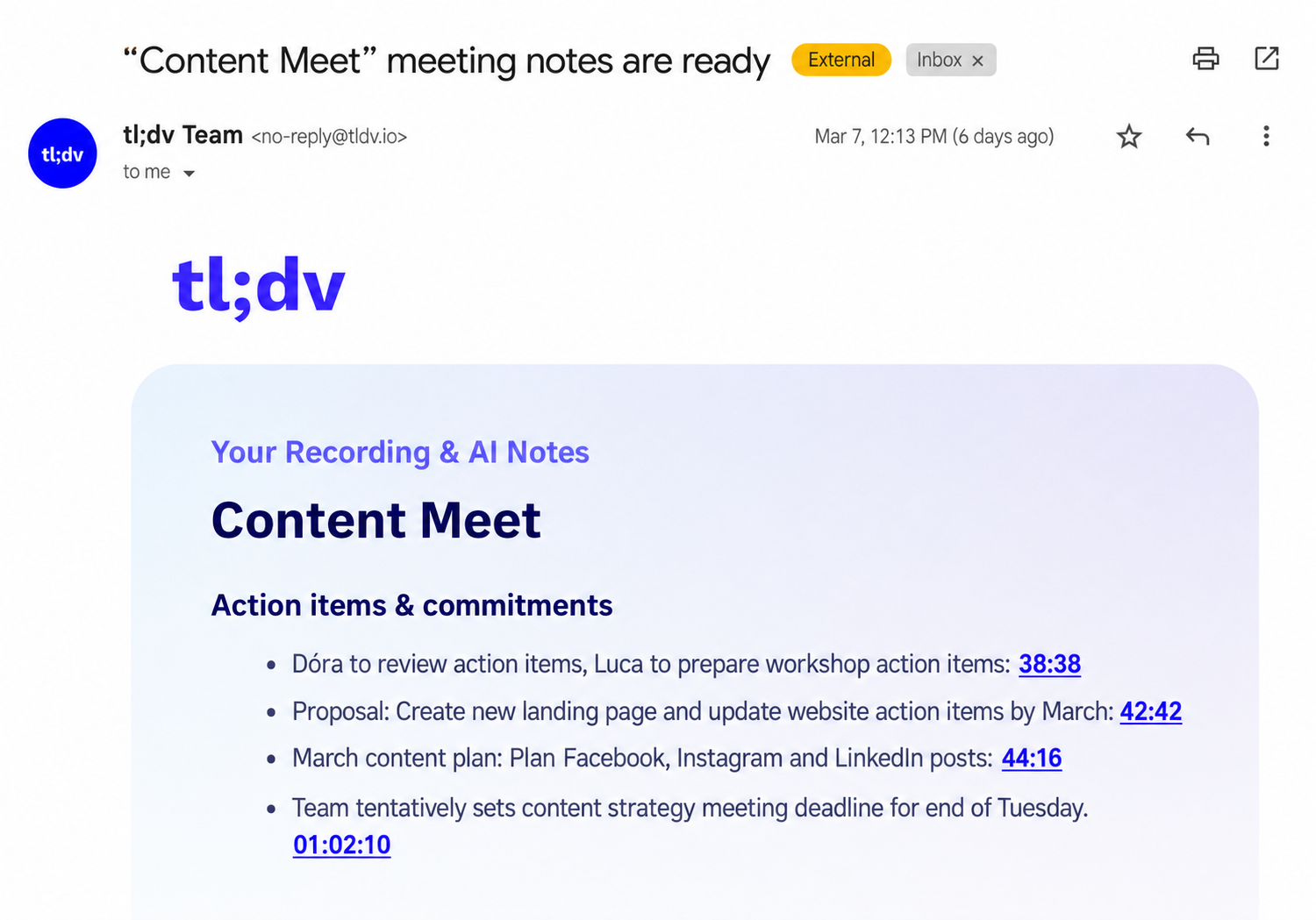
#m1-p#tl;dv can be a good choice for those who want a helpful bot for their meetings but don't want to pay for it.##
Despite the weaknesses mentioned, we can get a summary outline and a to-do list similar to Fireflies for our meetings, even completely free of charge.
So, if someone doesn't want to invest in such a tool right away, then this can be a good entry-level program for trying out AI note-takers.
Notta
The Notta has a relatively stricter business model; in the free version, it only allows for a total of 120 meetings, each up to 60 minutes long, to be transcribed, and can also process a limited number of manually uploaded audio files.
Similar to the others, here too there's an option to automatically join and record meetings (Zoom, Google Meet, Microsoft Teams, Webex), or even transcribe personal conversations using its mobile app, all in real-time.
It offers extensive language support – according to the company, it can handle 58 different languages – and many of them boast high accuracy.
For Hungarian, this tool was also the best in our test when it comes to verbatim notes.
One of Notta's strengths is its simplicity and its ability to integrate into daily workflows. You can connect it to your Google or Outlook calendar, and it will automatically join scheduled calls to take notes. The platform also offers easy integration with tools like Notion, HubSpot, Slack, or Zapier. For example, Notta can send a transcript to a Notion page or automatically forward a meeting summary to a Slack channel.

Source: https://www.notta.ai/en
Its summaries are only available in English within its own platform, where we can find a brief summary, a draft memo of the meeting, and any action items.
Unlike other tools, Notta does not automatically send out summaries via email after the meeting; you need to log in to the platform for them. Overall, the summary here was the best worded and most fluent, but it oversimplifies a lot of information and doesn't fully convey the entire content of the discussion.
#m1-p#If you want a quick, easy-to-understand, but less detailed summary, this might be the best choice.##
What's more, it can even generate a mind map from the conversation, allowing us to track the most important information from the discussion.
Fathom
The Fathom is very fast: it generates AI-powered summaries within seconds after the meeting ends and provides accurate transcripts with support for 28 languages.
It offers a quite favorable model for users, as, similar to tl;dv, most features can be used for free by individuals, and even companies won't face many limitations with the free version.
#m1-y#Unlimited meetings and summaries can be created even with the basic version.##
These summaries are received both via email and within the platform, although the AI summary is only available in 7 languages, none of which is Hungarian. So, if we want to use these, we need to choose one of the major world languages. In the summaries, individual bullet points are provided as links, so if you want to know the details, clicking on them will allow you to review the relevant part of the conversation on the platform.
However, literal notes are available in Hungarian, so if these are important to someone, they shouldn't rule out Fathom.
It also lists important moments and future action items, assigning them to the meeting participants – similar to other programs. Fathom integrates seamlessly into your workflow, though this is more true for the premium version. It can directly sync meeting notes, summaries, and items with other tools, such as CRM systems or task managers, eliminating tedious post-meeting data entry.

Source: https://fathom.video/
After installing the extension, it can join conversations automatically or manually. Another special feature is that if there's an important moment in the meeting, you can easily signal it to the program using the extension's dialogue box, and this will be highlighted separately in the summary later.
Additionally, an interesting feature is that during the conversation, you can see in real-time who spoke for what proportion of the meeting, which might indicate that you should give others more space during a brainstorming session if you've spoken a lot.
If you're looking for an easy-to-use tool that automatically summarizes meetings and doesn't require advanced features or extensive language support, Fathom might be suitable for you.
Alrite
The Alrite is a Hungarian-developed speech recognition program that, unlike previous programs, does not function as a bot, meaning we won't encounter it during meetings. With Alrite, we can generate accurate transcripts from conversations recorded previously or in real-time.
This is particularly useful for professionals working in media or fields where they participate in lengthy interviews or events where it's crucial to get a word-for-word accurate transcript of what was said.
The free version offers only a 30-minute trial, during which you can get an accurate transcript of the audio recording you upload. In this version, you won't receive timestamps, a summary, or a list of action items; these features are only available in the premium version.

Alrite can be a treasure for professionals working in media, as its services are primarily tailored to them: it can facilitate recording interviews, simplify subtitling various video materials, and even generate keywords.
As a Hungarian development, Alrite produced the most accurate transcript of the conversation, with only occasional errors, likely due to its inability to recognize English-origin words or brand names.
If you're looking for an accurate transcript of your conversations rather than a summary, and you don't mind recording the audio yourself beforehand, then Alrite could be your tool, specifically tailored for Hungarian speech.
Comparison
While the tools we tested can be effective aids in our meetings overall, they can be most helpful in different situations and ways. Therefore, when choosing, it's important to clarify what you primarily want to use them for.
The Fireflies is one of the most well-known heavyweights in this sector, and it can be a good choice for meetings where we want to gather our action items for a given period and also want a brief summary of what was said. After the trial period, the free version also generates unlimited transcripts, and the AI provides limited summaries. We can also ask Fred, our AI assistant, about what was discussed.
The Notta could be the best choice if quick, easy to understand, but less detailed summary. In the basic version, you can record a total of 120 minutes, after which a subscription is required if you wish to continue using it.
For those who do not want to pay for this service, or who simply want to try integrating AI note-takers into their daily routines, we recommend the tl;dvor the Fathom. In both cases, you can use the various functions with relatively few limitations . The only major difference between the two programs is that Fathom generates its summaries in English, while tl;dv sends out Hungarian summaries. So, if someone prefers to receive summaries in Hungarian, they can make their choice accordingly.
If you prefer no one else to join the meeting, or if the presence of bots is bothersome, then Alrite could be the solution, as you can upload files either retrospectively or in real-time. The program is specifically designed for the Hungarian language, and creates by far the best Hungarian verbatim transcripts. However, it was primarily tailored to the needs of those working in media and is especially useful during interviews, as it cannot provide summaries of what was said.
Summary
Whichever one you choose, it's sure to be a great help in your daily life, whether for interviews, meetings, or any discussion. By using them, you can increase your efficiency and be more present in meetings, as you won't have to worry about taking notes on the information discussed. Thanks to their integration capabilities, you can also incorporate them into operational processes within the company, whether for listing current tasks, creating summaries, or connecting with CRM. It's definitely worth a try! Which one will you choose?
#promobox-en#Would you like your marketing to be created with the most modern tools?##






.jpg)
.png)