
Beyond chatbots, AI image editors, and translation tools, the market is now flooded with AI video editors. They can simplify and accelerate your content creation process. We’ve compiled a list of the top AI video creation tools to save you the research time!
Updated: 04/14/2025
.png)
The new king of content: AI video
Content is king. You may have heard this phrase often cited in marketing circles. It is especially true today, as the dominance of video content continues to grow:
#m1-p#Research suggests that 80% of online traffic is linked to video content.##
This also means that image and text-based content are taking a backseat to video.
The good news, however, is that beyond chatbots, AI image editors, and translation tools, there are now more and more high-quality AI video editors on the market.
Artificial intelligence allows us to create videos more cost-effectively and quickly, and many content creators are already taking advantage of AI video editors—whether for organic posts or online ads .
#m1-y#We could even update the quote above for 2025 to say: "AI video content is king."##
There are both overlaps and differences between the various AI video editors. Below, we present 6 AI video creation programs that can make your content production easier.
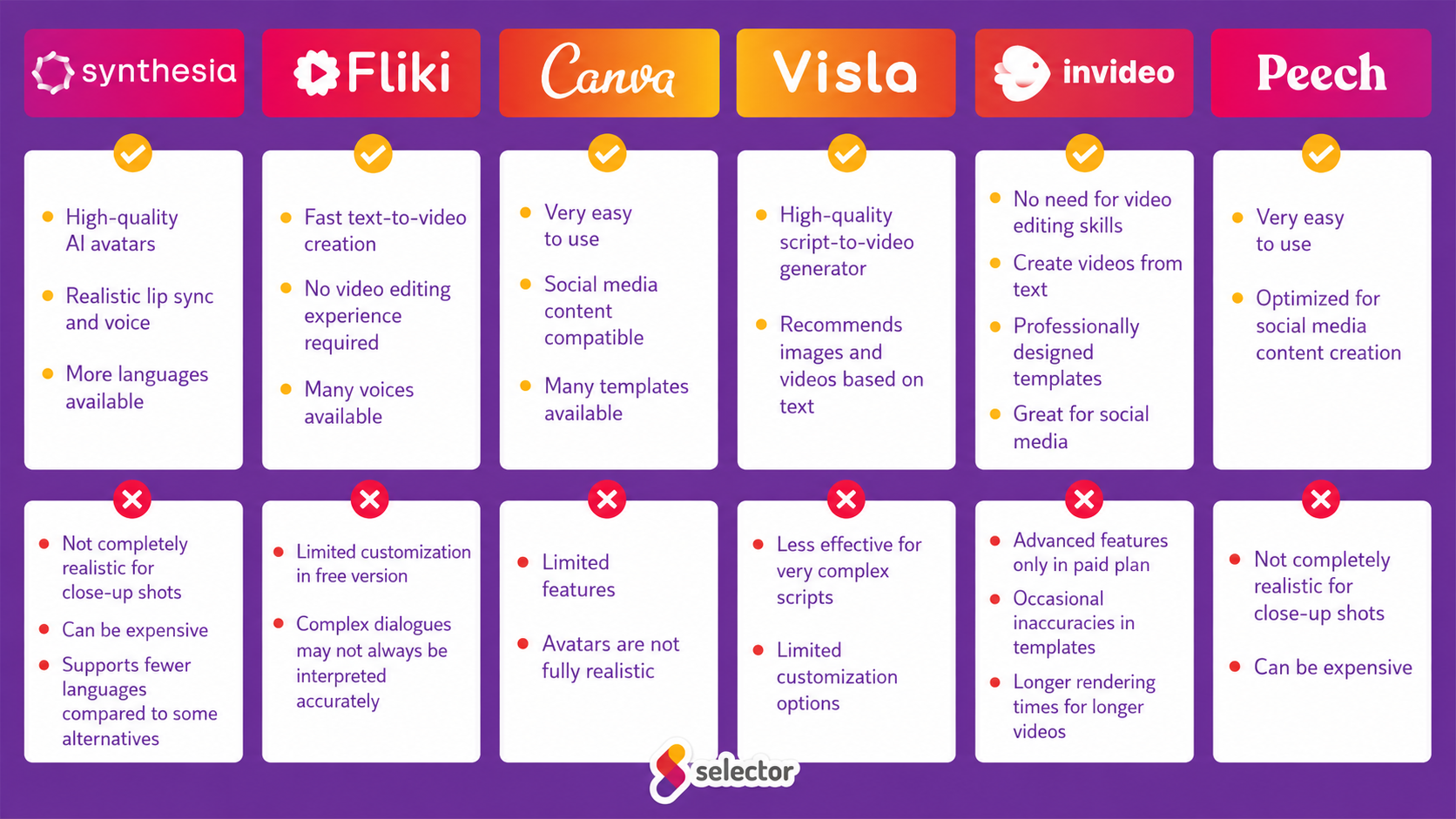
Synthesia - The best AI video creator with digital avatars
The Synthesia AI video generator is a perfect substitute for human actors when you need a presenter in your video.
For example, if your goal is to explain a product or service, or to film an educational video, you can save on the cost of hiring a presenter, as Synthesia offers a library of dozens of realistic digital avatars from all over the world.
What's more, you can even create your own completely unique avatar! You can choose not only the avatar's appearance but also its voice. Once you've found the right one, all you have to do is upload your script.

Source: Synthesia
Once you upload your script, the Synthesia AI video maker begins syncing it to the avatar so that it moves its lips and body as convincingly as possible. The avatars are extremely realistic, though you might notice a few unnatural movements when viewed on a large screen. However, this is not very noticeable and only the sharpest eyes will catch it, so Synthesia is perfectly suited for the job.
The AI video maker allows you not only to select avatars but also to add extra scenes, making it easy to highlight key points and customize your video. For example, the avatar can sit in the corner of the screen and talk while you showcase your product. You can also choose from Synthesia's templates, where you can present your message in bullet points.
Pros of Synthesia:
- High-quality AI avatars
- Wide selection of looks and voices
- Available in multiple languages
Cons of Synthesia:
- Not entirely realistic when viewed on a large screen
Fliki – If you need many different types of videos quickly
The Fliki AI video generator like Synthesia, has an avatar database, but it also includes features such as convert blogs, presentations, or photos into videos. Whether you use an avatar or not, Fliki AI's video editing system easily transforms text into motion graphics or speech.

Source: Fliki
#m1-y#Fliki offers over 2,000 realistic voices in more than 75 languages. It stands out from other AI video creators by combining text-to-video and text-to-speech AI capabilities, providing an all-in-one platform for content creators' needs.##
You can use Fliki for educational videos, explainer videos, product demos, social media content, YouTube videos, TikTok and Instagram Reels, podcasts, and video ads as well.
Fliki pros:
- Create various videos quickly
- No video editing experience required
- Available in many languages
Fliki cons:
- No distinction between voice dialects
Canva – Effortless social media video content
Canva arrived and took over. Its image editing feature is incredibly popular, not just among social media content creators, but thousands of invitations and birthday greetings have also been made using Canva. It’s no wonder that Canva's AI video editor is also a favorite for many. It allows us to turn text ideas into videos with a single click.
With the Magic Media feature, you can create AI-generated videos from text and express your creativity using a variety of animations, visual elements, and effects.
#m1-p#Canva's AI video editor, much like its image editing interface, is very easy to use, allowing you to create videos quickly.##
Canva does not aim for photorealistic avatars; instead, you can choose from cartoon-style avatars or upload your own images to create videos. You can enhance your videos with various visual elements and make them dynamic using animations and effects.

Source: Canva
For social media content creation, we highly recommend Canva's AI video maker, as it allows you to create exciting videos quickly and easily.
Pros of Canva:
- Easy to use
- Create social media-ready content
Cons of Canva:
- Limited features
- Non-realistic avatars
VEED – Generating video content from text with extra creative features
VEED is becoming increasingly popular among those who want to create professional video content quickly and easily. Whether it's text-to-video generation, automatic subtitling, or AI image generation, VEED's toolkit offers a comprehensive solution.
On the VEED platform With an AI image generator you can create images, turn text into video, or add subtitles to your videos – all with just a few clicks.
VEED aims to simplify content creation while giving users the creative freedom to use animations, effects, and custom elements.
VEED can save you a lot of time, for example by automatically cutting out unnecessary video segments (such as long pauses or "umms"), and it can even automatically subtitle your videos, which, while not always perfect, does the lion's share of the work for you.
#m1-p#Thanks to its intuitive interface and wide range of features, it is a great starting point for beginner video editors and can also greatly support the work of more experienced professionals.##
Benefits of VEED:
- Easy to use with many extra features (e.g., various effects)
- Easily repurpose longer videos into short, social media-friendly content
- Not only creates but can also automatically subtitle your videos
- Automatically cuts out unnecessary parts from the video (umms, pauses, etc.)
- Supports collaboration (the free plan allows for 1-3 users)
Cons of VEED:
- In the free version, you have to accept that a watermark will be added to your video
- Their built-in graphics are nice, but they may not meet every need
InVideo - Text, template, and you're done
The InVideo is an excellent AI-powered editor for creating marketing, product, or service explainer videos. It can create spectacular, high-quality videos from your text in minutes. It offers a variety of professionally designed and animated templates.
To use the AI video generator, all you need to do is enter your text, choose the best template or customize your own, and then download the finished video.
The video content can then be shared directly on social media platforms such as YouTube, Instagram, and Facebook.
We recommend InVideo for creating ads, presentations, and video testimonials.
Pros of InVideo:
- No video production background required
- Videos created from text in minutes
- Professionally designed templates
- Direct sharing to social media
Cons of InVideo:
- Priority support is only available to paid subscribers
- Overwhelming number of templates
- Long rendering times for longer videos
Visla - AI video creator from idea to execution
The Visla AI video editor allows you to create a video from scratch. If you don't have a script, that's not a problem either.
Visla can generate a simple video script with short, concise paragraphs. It then searches for images and video content that match the script. Finally, you get a video assembled based on the script, which you can publish immediately.
The scriptwriter and automatic video creator features are impressive on their own, but Visla has other possibilities in store as well.

Source: Visla
You can even record videos directly on the AI video generator interface, and it also detects if the speaker leaves longer pauses while talking and cuts out these dead air moments, as well as "umms".
You can also transform recordings of video lectures and meetings into content using Visla. Just like a good assistant, it can record meetings so that you can use different parts of them later for content creation.
Pros of Visla:
- Excellent script generator
- Suggests images and videos based on text
Cons of Visla:
- There isn't much help or guidance available for using it
Peech – AI video editor for content teams
The Peech Lite AI video editor is a powerful tool for speeding up content production. Its core strength is that you can easily and efficiently repurpose the same content for different social media platforms. You can simply select the aspect ratio and video length. It also recognizes faces in videos, to which you can assign names and job titles. In future videos, it will automatically assign those names to the faces.
Once you have uploaded your brand assets, Peech can create personalized, branded videos that align with your specific brand identity. The AI video generator adds customizable captions to every video, and the intuitive editing interface is simple and easy to use.
#m1-y#The first draft is usually of such high quality that only minimal editing is required.##
In addition to the Peech Lite AI video editor, it is worth mentioning Peech Webinarsand Peech Testimonialsas well.
The former allows for the easy creation of shortened versions of webinars. You can simply select the segments you want to highlight from the webinar. When exported, the videos are already fully aligned with your brand identity and ready to be shared.
With Peech Testimonials, you can create high-quality testimonial videos: you can easily invite your customers to share their feedback via the app, which sends instructions to clients on how to record the video. Once completed, the testimonial videos will include captions and branding—making them ready to share!
Benefits of Peech:
- Easy to use
- Accelerates social media content creation
Cons of Peech:
- Only works with existing videos
FlexClip - creating videos with ease
The FlexClip clean user interface is easy to navigate, making it simple for even those without prior video editing experience to master.
Targeting a wide audience, it allows for the easy creation and editing of videos for business purposes for a brand, company marketing activities, or social media content, but it is also excellent for personal use such as for family occasions, birthdays, anniversaries, or travel vlogs.
By using templates, you can truly create video content in minutes, whether for YouTube, Facebook, Instagram, or TikTok, and the editor also supports creating variations for different formats.
One of the main advantages of FlexClip is that it is a cloud-based platformthat allows multiple team members to collaborate, although the latter is only available with the ‘team’ subscription , which can be requested for as few as 2 people at an affordable price.
It offers numerous AI-based video creation and editing features that, in this combination, cannot be found in any other solution.
By entering a text prompt, we can truly create videos in minutes that would take hours to produce manually. FlexClip's AI text-to-video tool can generate video content based on the text we provide or URLs of websites.
#m1-p#It can even transform blog posts, articles, news, and other text-based content into stunning videos.##
Furthermore, we can choose between two generation modes: in one, the artificial intelligence summarizes the content, while in the other, it extracts the key points from the original content during video creation.

Source: FlexClip
Thanks to the AI feature built into FlexClip, we can also convert our provided text into realistic speech by putting it into the mouth of an AI character. Currently, we can choose from over 400 voices in more than 140 languages. We can also use this feature in reverse, which allows us to automatically generate subtitles for our own videos.
Advantages of FlexClip:
- It is very easy to learn and use
- Available online from anywhere, supports teamwork
- A vast toolkit is at our disposal (stock videos, photos, vector elements, music tracks, etc.)
Disadvantages of FlexClip:
- A subscription is required to export videos without a watermark
Conclusion
The tools above are already capable of a lot—but just imagine what they will be able to do in the future!
The algorithms of AI video editors are constantly being improved, and in the future, they are expected to be able to respond even better to user needs and create even more personalized video content. This could allow for the introduction of features such as automatic content recommendation or personalized video ads, which target audiences even more effectively.
In addition, a forward-looking development could be the creation of more interactive and engaging video content. For example, with the help of AI-driven virtual assistants, users could actively participate in videos through interactive games or quizzes.
Synthesia, Fliki, Canva, Visla, InVideo, Peech, and FlexClip are all excellent AI video editors for content creation, each offering unique benefits and functionality. We hope this overview has helped you determine which AI video generator will be most useful for your needs. We look forward to seeing what future innovations bring!
#promobox-szolg-social-en#Could you use the help of a professional social media agency to kickstart your social channels alongside your video content? We would be happy to help! ##






.jpg)
.png)