Nowadays, you can even create your own website with the help of artificial intelligence, without needing any coding skills. While building a site with AI might seem quick and easy, just because it works at first glance doesn't mean it's ready to go live. It is easy for errors to slip into the project that could degrade the user experience, slow down site performance, hinder search engine optimisation, or even pose security risks. Here are 5 areas you should definitely check before publishing your AI-generated website.
The website is ready – but is it ready to go live?
A few years ago, building a website required a professional or at least some development skills – nowadays, however, a well-crafted prompt is enough to create the first version of a stunning website in minutes.
However, these AI tools have not only simplified the process but also brought new challenges: it is by no means certain that the finished site will function correctly, load quickly, appear in search engines, or actually encourage visitors to make a purchase.
Checking the final result is therefore still essential.
How can AI help with website creation?
One of the biggest advantages of building a website with AI is that it significantly shortens the development process and reduces the amount of technical knowledge required.
Artificial intelligence can assist in areas including:
- creating the initial design
- building the structure
- generating HTML, CSS, and JavaScript code
- automating development tasks
- modifying existing code
- supporting debugging
With the help of these tools, you can create simpler websites even without deep technical knowledge. However, you may still need developer expertise for more complex functions and business requirements.
What is vibe coding, and what can it be used for in web development?
Vibe coding is an increasingly popular approach to AI web development. The essence of it is that the user describes their expectations for the website, as well as any subsequent modification requests, to the artificial intelligence using natural language.
An example:
Instead of manually writing the HTML, CSS, and JavaScript code for a form, you ask the AI to generate a responsive form with the necessary fields, specifying the colours, sizes, fonts, and any other requirements.
This approach can be particularly useful for creating prototypes, initial website versions, or simpler pages. However, it is always worth keeping in mind that code generated by AI does not always follow all the principles of secure and long-term maintainable development.
#m1-y#AI can speed up website creation, but a working website and a website suitable for live use are not the same thing.##
1. Is the website easy to use on mobile?
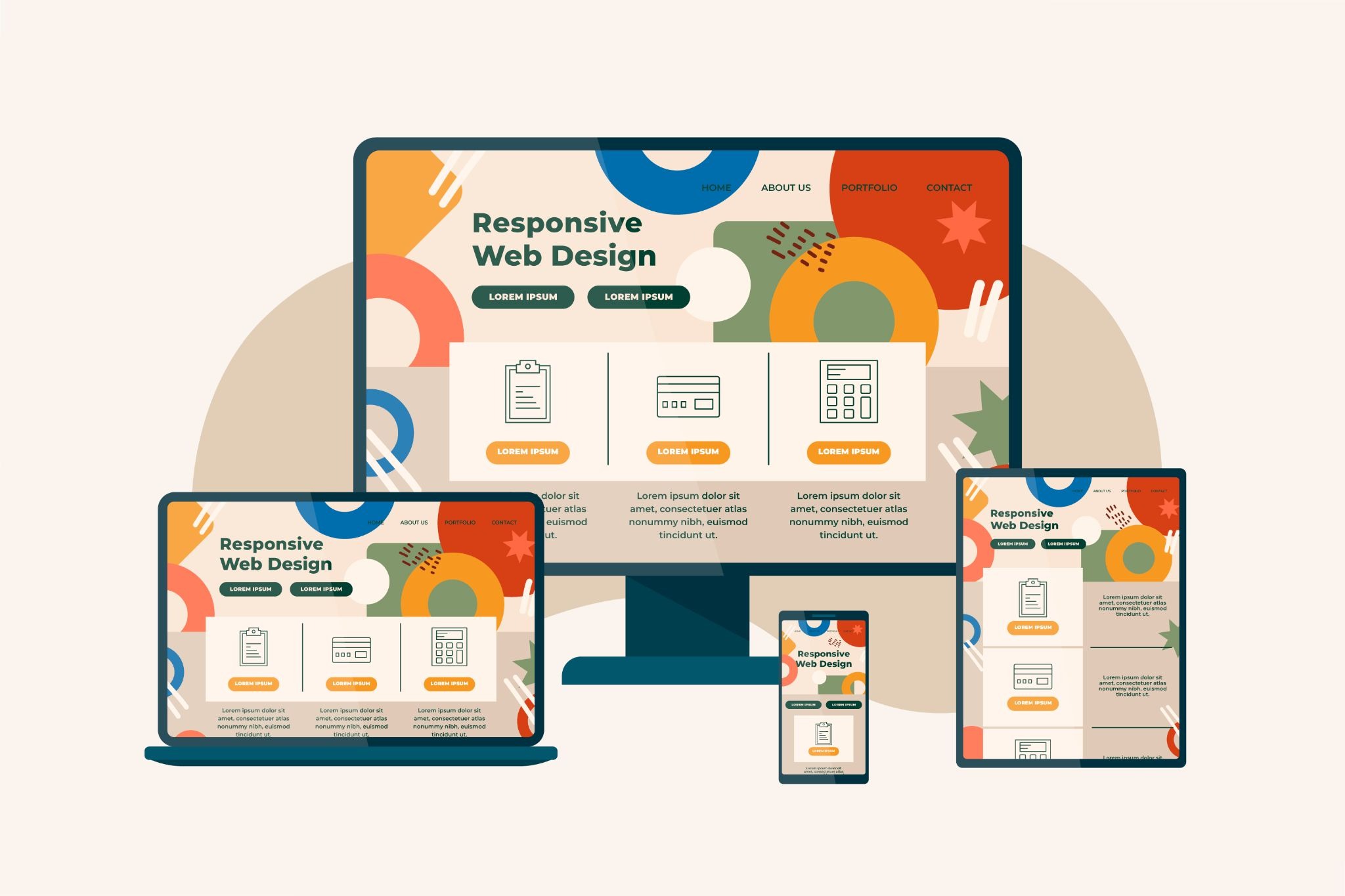
A website can easily look perfect on a laptop, but the mobile view is often misaligned, with elements hanging off the screen or text being too small or too large, which significantly degrades the user experience and the usability of the site.
A responsive website adapts to different screen sizes, ensuring a proper display on mobile, tablet, and desktop computers.
#m1-p#AI-generated sites often include responsive solutions, but they do not guarantee a truly mobile-friendly website.##
Which UX errors should you check for before going live?
User experience, or UX, shows how simple and convenient it is for a user to navigate and use a website.
Before going live, it is particularly worth paying attention to the following points to improve mobile usability:
- Navigation: Is it clear where important menu items and information can be found?
- Buttons and CTAs: Are the call-to-action buttons clearly visible and easy to tap?
- Readability: Are the font size, contrast, and text layout appropriate?
- Forms: Are they simple to fill out and submit on a mobile phone?
- Layout: Are there any overlapping elements, cropped images, or unexpected horizontal scrolling?
An example:
Suppose that in mobile view, the contact button leading to the quote request form is covered by an image. A visitor wants to request a quote, but because they cannot find the button or the form, they leave the site instead.
Even if everything works perfectly from a technical standpoint, you can lose potential customers due to UX errors, which is why performing a UX audit is so important.
How can you tell if your website's user experience is truly up to scratch?
One of the simplest ways to check your site is to walk through key user journeys on different devices, such as searching for products or filling out a contact form. It is also worth asking others to test it, as you may easily overlook issues as the developer that would be immediately obvious to a first-time visitor.
If you want to be certain, a professional UX/UI audit might be the best choice for you. The Selector UX/UI audit is specifically designed to uncover usability, navigation, visual, and conversion issues.
#m1-p#A website works best when the visitor doesn't have to think about how to use it.##
If you are interested in the topic in more depth, the following article may be useful: UX/UI audit: how to find out why your website isn't delivering results?
2. Is your AI-generated website fast enough?
User experience is fundamentally influenced by website speed.
#m1-p#If a website loads slowly, visitors may leave before they even get to see its content.##
Automatically generated code can contain redundant elements, unoptimised code, or unnecessarily large resources—all of which can contribute to a website slowing down.
How can you check a website's speed and technical performance?
A great starting point for testing website speed is Google's free PageSpeed Insights tool. After entering your URL, it evaluates desktop and mobile performance separately and provides further information and suggestions for fixing any issues found.
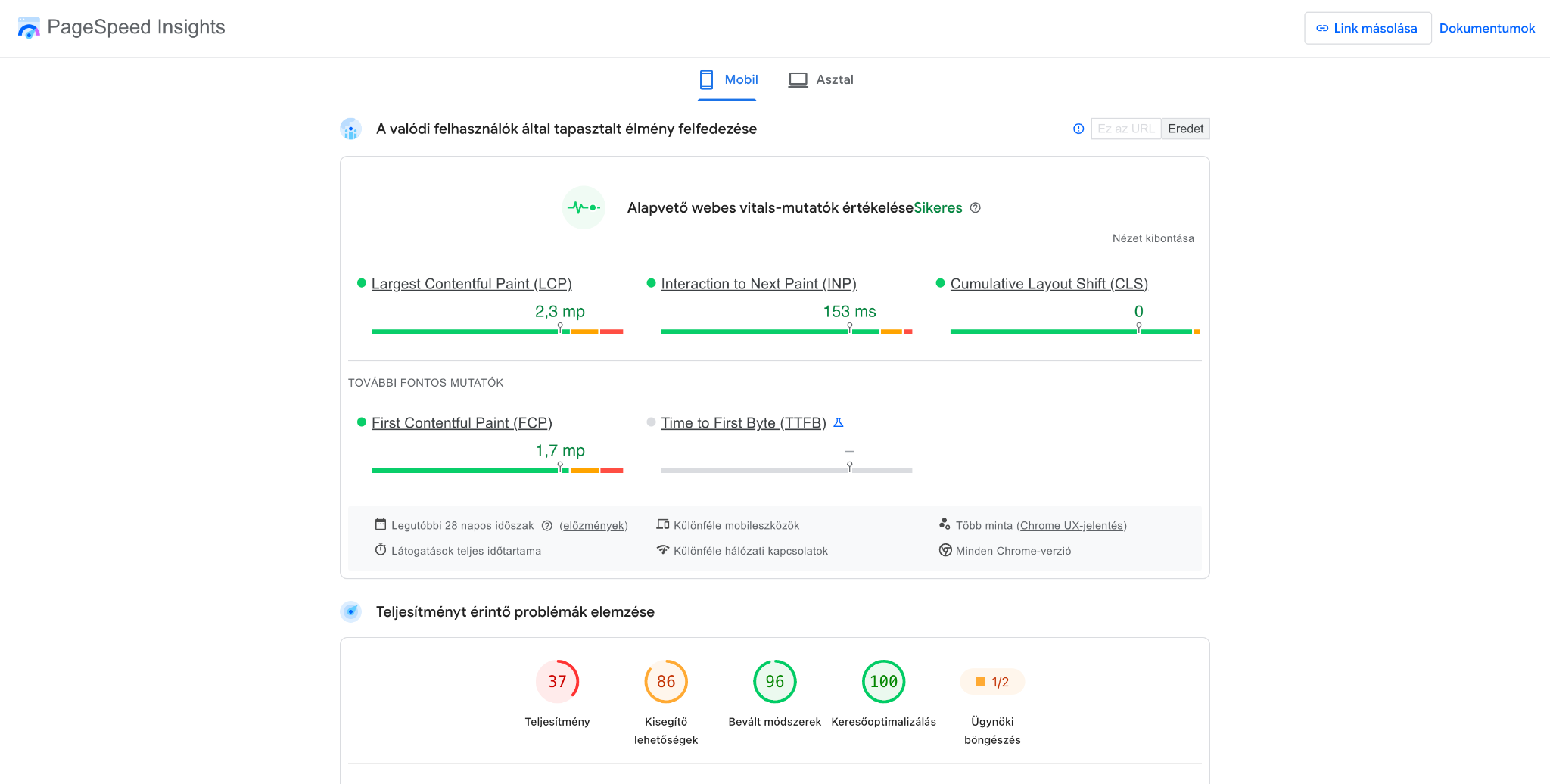
Google's Core Web Vitals metrics help assess a website's loading speed, interactivity, and visual stability, all of which are important for both user experience and search engine optimisation.
These three main metrics are as follows:
- Largest Contentful Paint (LCP): Measures the time it takes for the largest visible content element to load. The recommended value is 2.5 seconds or less.
- Interaction to Next Paint (INP): Examines the speed of visual responses to user interactions. A good value is 200 milliseconds or less.
- Cumulative Layout Shift (CLS): Measures the extent of unexpected layout shifts. The recommended value is 0.1 or less.
These metrics help you understand how visitors perceive your website's performance in practice.
Tracking page speed using PageSpeed Insights You can read more interesting facts and useful information on this topic in our article.
What technical issues can slow down a page?
There are several reasons why a website might be slow, but for AI-generated pages, it is worth paying particular attention to the following:
- Oversized image files: improperly compressed images can significantly increase loading times.
- Unnecessary JavaScript: excessive or poorly optimised code can slow down rendering and interactions.
- Too many external resources: fonts, tracking codes, and third-party services can increase the number of network requests.
- Inadequate caching: without caching, the browser has to download certain resources repeatedly.
- Poor server-side performance: slow hosting or inefficient server-side processes can also degrade loading times.
When optimising, it is worth starting with the major issues, such as reducing the size of oversized images, removing unnecessary code, and correctly configuring caching.
#m1-y#A fast website is not just a technical advantage: it can also contribute to a better user experience and help you achieve your business goals.##
3. Is the site ready for launch from an SEO perspective too?
It is no use having a spectacular, responsive, and user-friendly website if your potential customers cannot find it in search engines.
The search engine optimisation, or SEO, aims to ensure that search engines can more easily discover, interpret, and index the website's content, thereby improving its chances of appearing in the results for relevant searches.
This is precisely why you must perform an SEO audit of the website before launch, which helps uncover technical and content-related issues that could hinder search visibility.
Does a website become SEO-friendly just because it was created with AI?
Unfortunately, not necessarily.
While many SEO settings can be automated during AI-based website creation, this does not guarantee that the finished site will be suitable from an SEO perspective. AI is capable of generating meta titles, descriptions, headings, and text content, but the quality of these depends heavily on the prompts provided and the tools used.
Technical SEO errors can easily occur, such as faulty heading structures, overly generic meta descriptions, a failure to address the visitors' search intent, or incorrect internal linking.
Search engine optimisation is not just about placing keywords: it is important that the content is clear, useful, well-structured, and tailored to the needs of the target audience.
Will Google find and correctly index your new website?
For your website to appear in search results, it is essential that Google can discover and properly process its content.
Several technical settings must be in order for this to happen:
- Sitemap: A sitemap helps search engines identify your important URLs.
- Robots.txt: You must ensure that this file does not accidentally block the crawling of important pages.
- Noindex settings: When going live, ensure that no instructions remain on pages you want indexed that would exclude them from search results.
- Canonical URLs: For duplicate or very similar content, it is important to specify the preferred URL.
- URL structure: Simple, consistent, and readable web addresses make navigation and content organisation easier.
You can use Google Search Console to check your indexing status, submit your sitemap, and inspect key URLs. (However, it is important to note that having the correct technical settings and submitting a sitemap does not guarantee indexing on its own!)
What should you check on a new website from an SEO perspective?
Before going live, you should answer the following questions:
- Does every important page have a unique, relevant meta title and description?
- Do the headings form a logical hierarchy?
- Do your images have appropriate, descriptive alt text?
- Does the page content genuinely answer your target audience's questions?
- Are your internal links working?
- Are your important pages indexable?
- Is the website mobile-friendly?
A comprehensive SEO audit can help uncover hidden technical and content issues, as well as other website SEO errors, especially if you are unsure whether your AI-generated website's SEO settings are correct.
#m1-p#An AI-generated website will not automatically be search engine optimised. Effective SEO still requires deliberate planning and monitoring.##
Does your AI-built website appear in ChatGPT responses?
Just because a website was created with the help of artificial intelligence, it does not guarantee that it will perform well in AI-based search and answer-generation systems.
Beyond traditional Google searches, it is becoming increasingly important for website content to appear in responses from Google AI Mode, ChatGPT, Gemini, Claude, or Perplexity. However, AI-generated text or standard technical SEO settings are not enough to achieve this.
The AI SEO (AEO/GEO) goal is to ensure that website content is easily interpretable, credible, and usable for AI-based search systems as well.
Key factors in this include:
- well-structured content,
- clear and concise answers,
- professional credibility,
- as well as your brand's online presence and mentions.
That is why it is worth examining how well even an AI-generated website meets these expectations. Our free AI SEO (AEO/GEO) audit service can help with this, as it can uncover shortcomings that limit your website's AI visibility and identify opportunities for improvement.
4. Is your website actually measuring what you want it to?
The work doesn't end when a website goes live; you also need a reliable measurement system to understand visitor behaviour and improve site performance.
Web analytics allow you to track where your visitors came from, which pages they viewed, and what actions they took. One of the most common problems is that the tracking code is installed, but events are not being recorded correctly or are being duplicated.
What should you measure on a new website?
Your measurement plan should be aligned with your website's goals.
For a service provider, the number of quote requests and enquiries might be important, whereas for an online shop, tracking items added to the basket and successful orders is likely to be more critical.
With Google Analytics 4 (GA4) , you can track the following events, among others:
- page views and user activity
- clicks on important buttons
- successful contact form submissions
- add-to-cart actions and purchases
- other business-critical actions
#m1-y#You can also mark the most important events in GA4 as key events.##
How can you tell if GA4 and Google Tag Manager are working correctly?
With Google Tag Manager (GTM) allows you to manage various tracking codes and measurement events without having to modify the website's source code directly every time.
However, the settings must be tested. You can use the GTM Preview mode to check when individual tags are triggered, and the GA4 DebugView to examine the events received during testing.
Special attention should be paid to duplicate events: for example, if the same form submission is recorded by two separate measurement solutions, it can skew your reports and business decisions.
As part of our web analytics service, we are happy to help you set up GA4, GTM, custom events, conversions, and your entire measurement system.
What should you check in your cookie banner and Consent Mode settings?
For web analytics tracking to function correctly, your data privacy and consent management settings must also be checked.
A cookie banner is not just a pop-up notification: for it to function correctly, the user's choices must align with the data processing and tracking technologies being used. Before going live, it is particularly important to test what happens when a user accepts or rejects the various consent categories.
With Google Consent Mode v2 allows Google's measurement and advertising solutions to adjust their behaviour based on the user's consent status.
And if your measurement system is already set up, but you are not sure whether it is tracking events correctly, then Selector's web analytics audit can help uncover errors in your GA4 and GTM configurations.
#m1-y#Faulty measurement is often more dangerous than having no measurement at all, as inaccurate data can easily lead to harmful business decisions.##
5. Is a site built with AI secure and maintainable in the long term?
A less visible issue regarding websites is security and maintainability, especially in the case of websites built with AI.
A website can still contain errors or vulnerabilities even if everything appears to be working correctly at first glance.
This is particularly important if the site handles personal data, includes user accounts or payment options, or communicates with external services.
Is AI-generated code secure?
AI is capable of generating functional and secure solutions, but there is no guarantee that all code it produces will meet security requirements.
For example, an AI-generated application or website might:
- fail to properly validate user input,
- not manage access permissions securely,
- expose sensitive information or API keys in client-side code,
- use outdated or vulnerable dependencies,
- fail to handle errors and unexpected user actions correctly.
#m1-p#Especially when using vibe coding, it is important to ensure that rapid website development does not come at the expense of security.##
What does it mean for a website to be production-ready?
The production-ready term indicates that the website is properly prepared for deploymentand real-world user interaction. This means it is not just a case of the website being accessible and appearing to work.
Key considerations include:
- proper testing of critical functions,
- a secure HTTPS connection,
- appropriate management of permissions and access,
- protection of sensitive data,
- error logging and traceability,
- recovery and backup options,
- infrastructure capable of handling the expected traffic.
The website complexity naturally determines the depth of testing required for the website. For example, the risks associated with a simple landing page differ from those of an e-commerce site or a system handling customer data – the latter requires more thorough security checks.
What needs to be done after launching an AI-generated site?
The project cannot be considered complete just because the website has gone live.
Continuous monitoring and maintenance are essential for smooth operation.
It is worth ensuring that software, plugins, and dependencies are updated, regular backups are performed, and any potential bugs or security issues are monitored.
A properly established maintenance process can help prevent serious downtime, data loss, or security issues in the future.
#m1-p#AI can help build the website, but the operator remains responsible for its long-term security and performance.##
What can you check yourself before launch, and when should you involve an expert?
You can perform basic checks yourself, such as testing mobile responsiveness, buttons, or forms; however, for uncovering more complex technical and SEO issues, it is usually worth involving an expert who can help identify hidden errors through a comprehensive website audit .
When should you request a UX/UI audit?
The A UX/UI audit can be particularly useful if your website has good traffic, but users are not completing the desired actions, such as making a purchase or requesting a quote.
The following issues may indicate that it is time for a UX/UI audit:
- Low conversion rate: many people visit the website, yet few purchases, quote requests, or enquiries are made.
- High bounce rate: a significant proportion of visitors leave the site without any further interaction.
- Complex navigation: users struggle to find the information, products, or services they are looking for.
- Poor mobile user experience: the website is difficult to use on mobile devices, with some elements being too small or not displaying correctly.
- Unclear CTA buttons: it is not obvious to visitors where or how they should proceed.
- Complicated forms or checkout process: users abandon the process while filling out forms or making a payment.
- Difficult-to-read content: cluttered layouts, long blocks of text, or poor visual hierarchy make it hard to process information.
- Low user engagement: visitors do not click on important elements or fail to reach key subpages.
A comprehensive website UX/UI audit helps uncover obstacles that hinder the user experience and can provide concrete suggestions for improvement. Based on the results, conversion rate optimisation (CRO) can help turn more visitors into leads or customers.
When should you request a web analytics audit or tracking setup?
A detailed review of your tracking system may be justified if:
- it’s not clear how GA4 events work,
- you’re seeing discrepancies in your reports,
- or you’re unable to measure your business goals effectively.
The web analytics audit helps uncover errors in existing configurations, while measurement setup supports the creation of the necessary events and tracking processes.
When should you request an SEO audit?
If your website is finished but you’re unsure whether Google can process its content correctly, an SEO audit can help uncover indexing, technical, or content-related shortcomings. This is particularly useful if the site has not previously had a deliberate search engine optimisation strategy.
When should you request an AI SEO (GEO) audit?
An AI SEO (GEO) audit can be particularly useful if you want your website to be more visible not just in traditional Google search, but also in the responses provided by AI-based search engines and answer-generation systems, such as ChatGPT, Gemini, or Perplexity.
The following signs may indicate that it is worth conducting an AI SEO audit:
- Your brand does not appear in AI responses: ChatGPT or other AI-based search engines do not mention your business in their answers to relevant queries.
- Your competitors are recommended more often: AI systems favour competing brands, products, or services.
- Your organic traffic is declining: the number of visitors from Google has dropped, while search habits are also shifting.
- Your website lacks direct answers: your content does not provide clear, well-structured answers to the common questions of your target audience.
- Inadequate content structure: headings, internal links, or content hierarchy may be making it difficult to interpret information.
- Weak online brand presence: there are few credible external sources, professional mentions, or relevant backlinks associated with your business.
- Uncertainty regarding your website's technical readiness: you are unsure whether AI-based search systems can access your important content and process it correctly.
- You are launching a new website or redesigning an existing one: you want to consider AI-based search requirements before going live.
A comprehensive AI SEO (AEO/GEO) audit can help uncover the gaps limiting your website's AI visibility and identify the content, technical, and authority-building improvements that can boost your chances of appearing in AI-based search results.
Should your website be built by AI or an expert? You don't necessarily have to choose.
With the rise of AI-powered web development, many people are asking: why would I need a professional if I can build the website myself using artificial intelligence?
AI can be an excellent tool for brainstorming, creating prototypes, or implementing and automating certain development tasks. Experts can complement this tool with their experience and business acumen, which helps ensure that the website doesn't just function, but also delivers results.
Hiring a professional and using AI tools are by no means mutually exclusive.
When is it worth outsourcing what you could solve with AI?
The cost of building a website consists of more than just the subscription fees for the tools used or the direct development costs.
It is also worth considering your own time, the hours spent troubleshooting, and the consequences of potential poor decisions.
You might be able to create a specific feature with a few prompts, but thoroughly understanding, testing, optimising, and ensuring it remains maintainable in the long run can take significantly more time.
In such cases, outsourcing is much more about using resources efficiently than it is about giving up on technical implementation.
Which parts of an AI-generated website should you have an expert check?
The user experience (UX), search engine optimisation, and web analytics are areas where business and strategic considerations play a role beyond just the technical settings.
The Selector's audit services can help uncover shortcomings that may not be immediately obvious but could still affect the website's performance. During the audits, development priorities can be identified, making it easy for you to decide which issues to address first.
Summary: AI accelerates development, while verification makes it reliable.
AI has opened up a wealth of new opportunities, even for those without development experience.
However, before taking your finished website live, it is essential to have it mobile usability, speed, search engine optimisation, web analytics and security checks. Each of these is a decisive factor in terms of site usability and achieving your business goals. With the right combination of AI and expert support, you can not only get your website built faster, but also lay the foundations for its long-term secure operation and maintainability.
#promobox#Have you built your website using AI, but aren't sure if everything is working as it should? With Selector's UX/UI, SEO and web analytics audits, you can uncover hidden errors and receive concrete recommendations for improving your website.##






.jpg)
.png)