Content creation is an endlessly creative, and thus often harder to plan, even chaotic process – but it doesn't have to be.
With ClickUp, you can easily organize your ideas, optimize your workflows, and automate tedious administrative tasks. In this article, we'll show you how templates, checklists, whiteboards, built-in AI assistants, and other powerful tools can simplify your daily work (even with the free plan!).
.png)
Why choose ClickUp as a content creator?
If you're a content creator, you know exactly how easily a day can become chaotic: blog posts, video ideas, social media drafts everywhere, and the clock is ticking…
This is where ClickUp comes in, serving as both transparent project management tool, and also an efficient, time-saving assistant.
We have been providing ClickUp consulting for several years, and have been using its various features ourselves for even longer. This means we know exactly what a well-configured system is capable of: not "just another administrative burden" for the team, but a real help in managing daily work.
Whether it's processes pre-optimized with templates and automations, content standardized with checklists, or visual brainstorming on a shared whiteboard, ClickUp helps you find the balance between creative freedom and structured work.
The appropriate views - such as calendar or board ("tile") views - help in transparently tracking tasks, while a well-configured, automated approval process can reduce unnecessary administration.
#m1-y#The best part is that most of ClickUp's features are available even in the completely free plan.##
(More about pricing here you can read.)
If you're looking for truly extra help, with the built-in AI assistant (ClickUp Brain) you can quickly generate new ideas and drafts without having to leave ClickUp - and you can even retrieve long-forgotten bits of information from any hidden corner of your workspace.
#m1-p#So, with a well-configured system, you can not only save time but also unleash your creative energies.##
This leaves you with more time and mental capacity for true creation - or a well-deserved coffee break! ;)
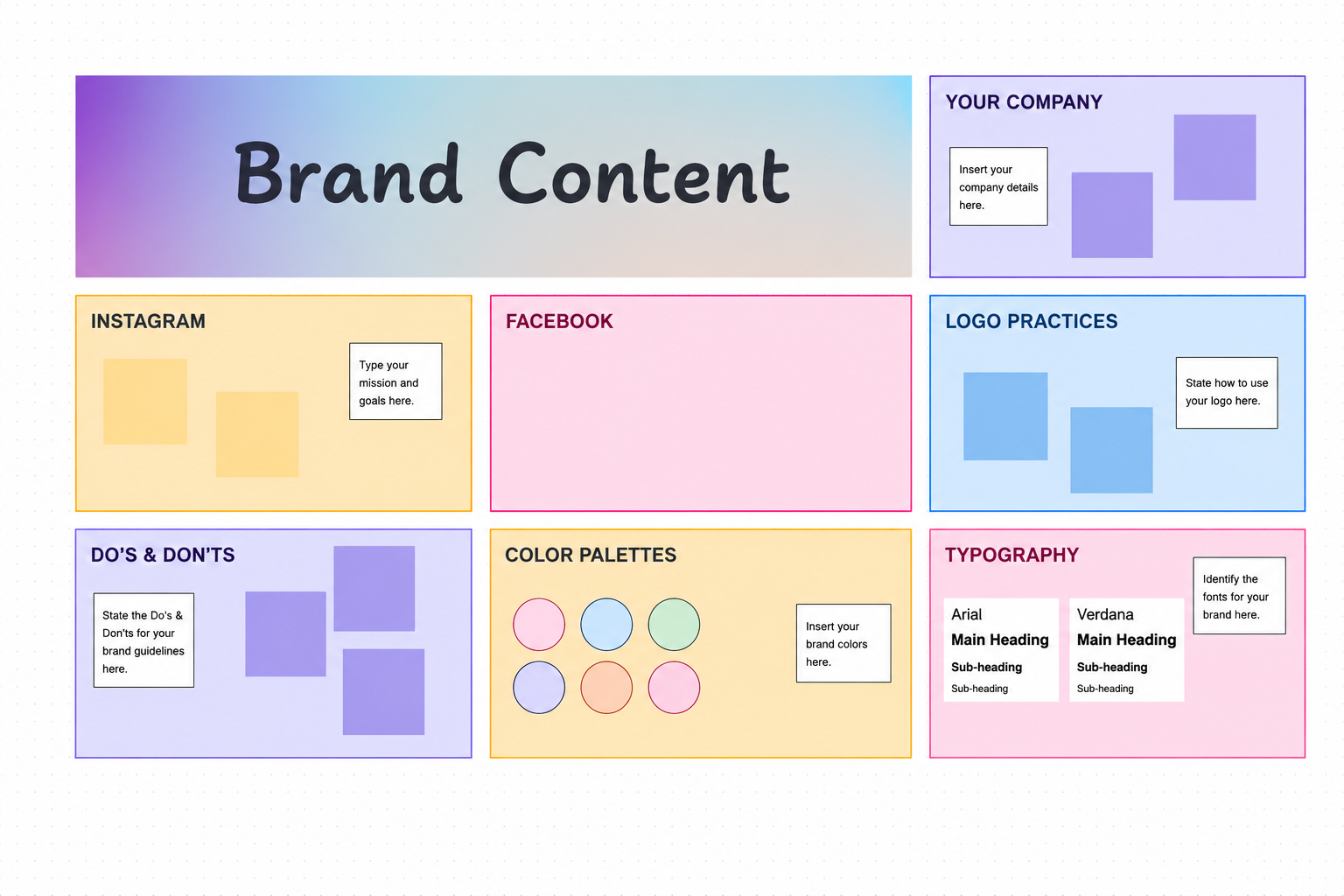
ClickUp Whiteboard: for creative brainstorming and visual planning
Could you use a digital surface where you can brainstorm with your team or clients, taking notes together in real-time?
If you're someone who loves to jot down ideas on beautiful, large whiteboards, arrange thoughts with sticky notes, and organize them with different colors in the analog world, then ClickUp Whiteboard will be a big favorite of yours. You can work on it alone, or edit it with others in real-time – so remote work won't stand in the way of collaborative brainstorming.
The canvas isn't restrictive; you can scroll indefinitely – space never runs out, so you can save as many images, notes, and ideas as you like.
#m1-y#It can become a mood board, a flowchart, brainstorming notes, or anything else that aids content creation.##
You can start with a completely blank slate, or you can dive into ClickUp's template library (you'll read more about this in an upcoming section) and choose from various branding, project management, content management, and other whiteboards.
ClickUp Checklists and Subtasks: How to Easily Build Standardized Workflows
We believe that every creative professional – no matter how experienced – needs a checklist. Why? Because:
- it takes the burden off our shoulders of having to remember everything,
- it helps prevent errors,
- ensures consistent execution of various workflows,
- and even improves collaboration between teams.
There's only one problem with checklists: if they're not always visible, they'll eventually be forgotten.
One brilliant feature of ClickUp is that if you create a task that always consists of the same steps – whether it's video production or contract signing – checklists and subtasks guide you through the process step-by-step, even automatically assigning these checklists to your tasks.
If it's always clear what the next step in the process is, even a brand new colleague can be assigned to independently create a blog post – they'll know exactly what to do and when.
#m1-p#Moreover, breaking down tasks into smaller, manageable steps not only helps eliminate errors but also provides an effective tool for those prone to procrastination.##
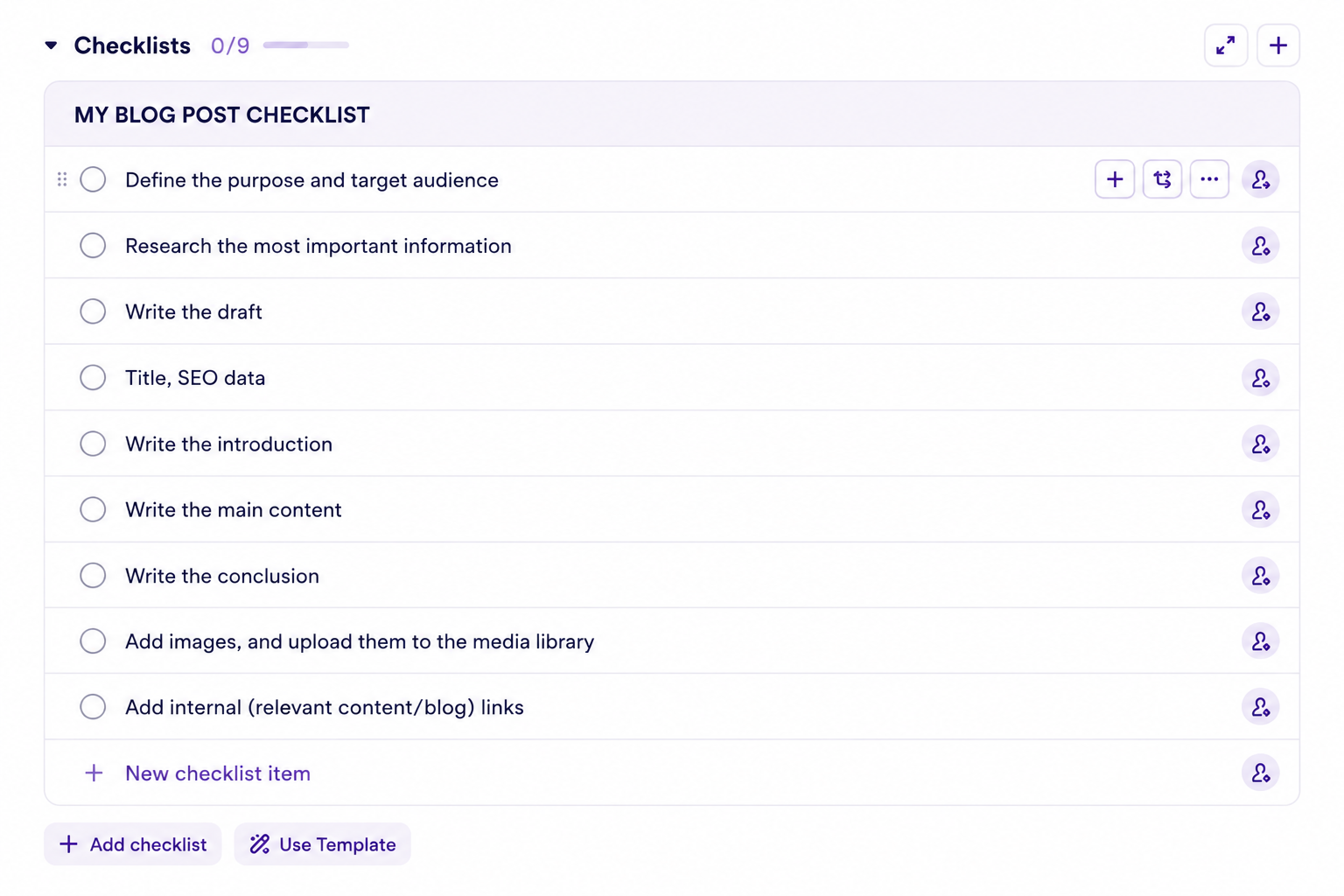
For example, we use one to help with blog post creation, a checklist, which ensures that every author knows exactly what their task is and what path leads from the initial opening of the task to the submission of the article. (Here, deadlines cannot be set, only assignees.)
If you want to break down tasks into smaller steps while also recording additional information (description, assignee, deadline, priority, other details) for the subtasks, then choose subtasks.
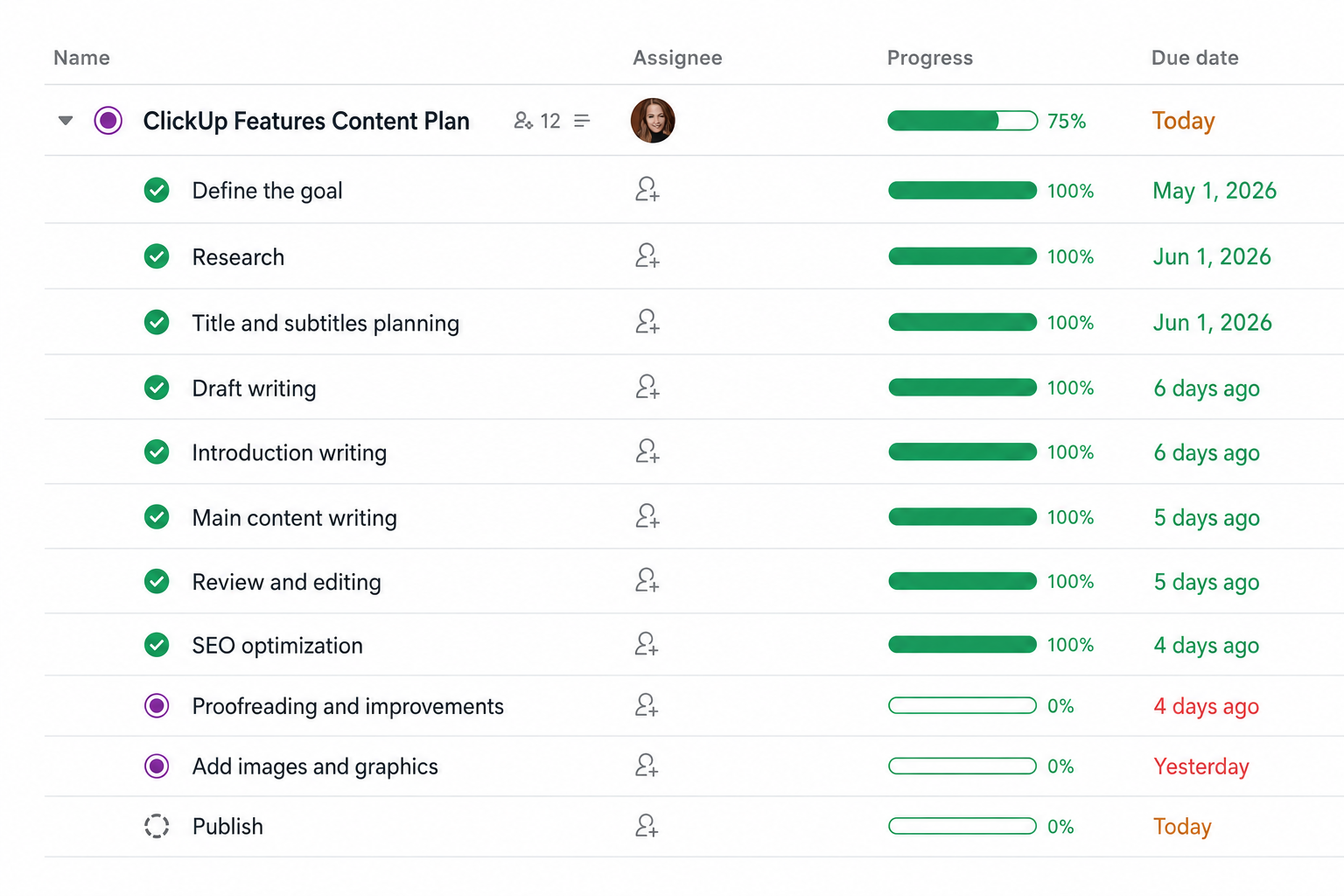
If you don't find this particularly impressive on its own, or if you want to get the most out of your ClickUp Workspace, then don't stop here – now we'll look at how you can sit back and enjoy ClickUp managing your workflows for you with templates and automations.
#promobox-newsletter###
Forget tedious administration – use ClickUp templates for fast, smooth, and precise work!
Once you've established the steps for your creative workflows, it's time to fire up one of ClickUp's most powerful weapons: templates.
You can create a template from either a task (the entire process of creating a new video, with subtasks), or the checklists shown above., whiteboard, or even from entire lists, folders, and Spaces.
Imagine it's Monday morning, and you sit down with your team to kick off a new collaboration and plan the entire process, from contract signing through content creation to invoicing. With ClickUp, it looks something like this:
With a single click, you create the project folder, which already contains a ready-to-use workflow, a content calendar, a brainstorming whiteboard, and a list for organizing administrative tasks – and you only have one job: to specify the content topics, deadlines, and assignees. Once that's done, you can lean back: every task smoothly and automatically moves from one assignee to the next – without you having to micromanage the processes.
Every step of research, outlining, copywriting, graphic materials, and publication is pre-set, every weekly social media post follows the approval and publication steps, and the planning, shooting, editing, subtitling, and publication of video content also proceeds in the prescribed order.
That's what templates can do.
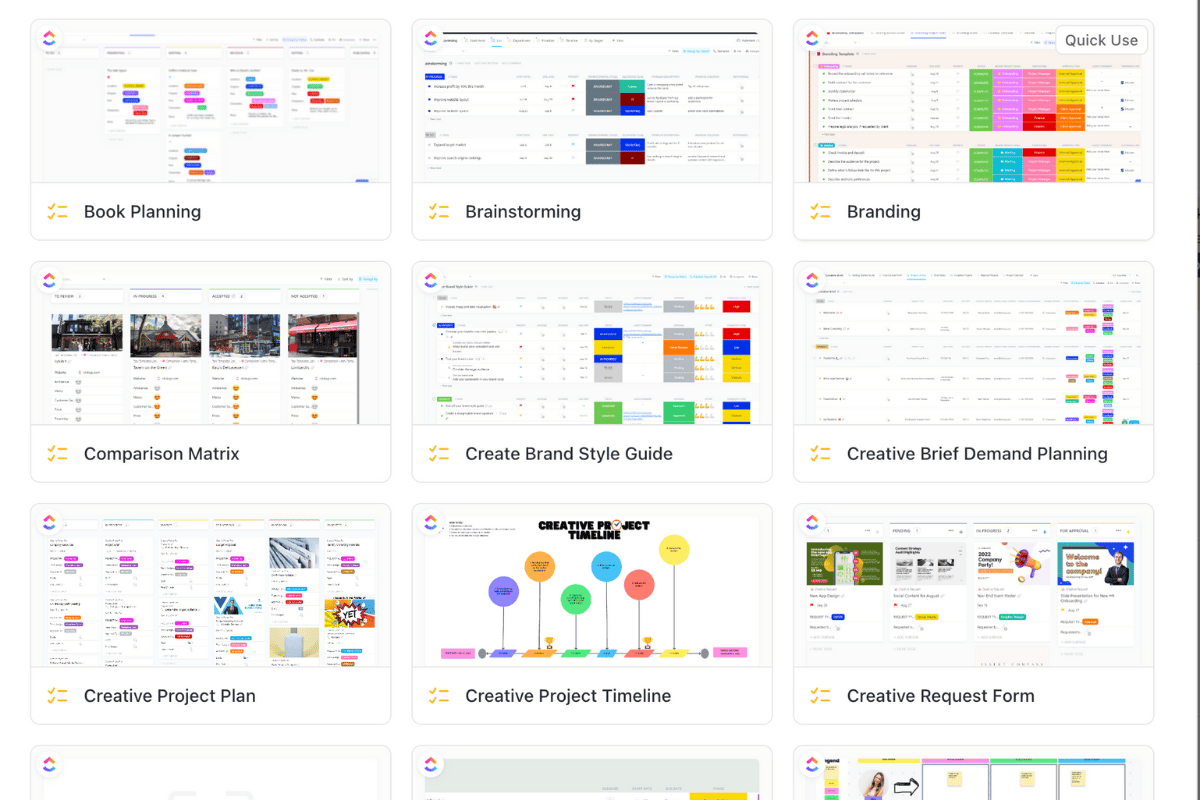
If you or your team have special needs, you can create custom templates, but ClickUp's own templates also offer a lot of inspiration, with a wealth of customizable foundations awaiting you in the field of content production alone:
Save hours and eliminate human oversight with automated processes!
We've arrived at the real powerhouse: the ClickUp automation features are true time and stress savers in content creation (needless to say, as a marketing agency we also utilize their power daily).
You don't have to manually check everything: every piece of content – whether it's a blog post, social media graphic, or podcast episode – quickly and smoothly passes through the approval chain and never gets stuck due to a forgotten email or a missed Slack message.
Furthermore, ClickUp can be connected with other systems via Zapier, Make, or similar software, such as Google Drive or Dropbox.
You can set it up so that when a “video” type task is created, the system automatically generates raw material and post-production folders on Drive, then links them back to the task. This way, you don't have to create folders, move files, or check if all materials are in the right place every time. It works by itself.
Automation not only saves hours each month, but also reduces errors caused by human oversight.. For a content creation team, this means creative energy is spent on producing and refining content, not on unnecessary administration.
#m1-y#With a well-configured, automated system, you can replace chaos with transparent, efficient, and stress-free processes.##
Instead of to-do lists, use process-tailored views – make your tasks transparent!
In ClickUp, visual workflow is the key to efficiency.
Whether it's weekly social media calendars, filming and editing video series, a creative team can only work accurately and effectively if it's clear who is working on what, and what tasks are expected from whom.
Here are some ClickUp views that can be particularly useful for content creation:
- List (this is usually the default setting): classic, yet incredibly versatile. You can sort tasks by status, priority, assignee, or any custom field, spiced up with various filters, so you always see exactly what you're looking for.
- Calendar view: allows you to see monthly content calendars, deadlines, and the publication schedule at a glance.
- Board view – commonly known as Kanban or “tile” display: makes task statuses transparent and simplifies team collaboration, as everyone can clearly see who is working on what and what the next step is.
- Gantt Chart: ideal for larger projects. You can visualize exactly who will be doing what and when, broken down by days, weeks, or months, making it easy to track deadlines and task dependencies.
- Timeline: similar to a Gantt chart – here too, you can visually track how tasks progress over time. It's especially useful if you have multiple projects running concurrently and want to see when there are peak periods or overlaps.
- Dashboard: by adding various cards (widgets), you can create reports on project progress, remaining and completed tasks, team member workload, tracked work hours, and much more.
- Table: perfect for managing detailed data. You can customize, filter, and sort every field, and easily export it, for example, when creating a report for the team.
If you work with clients, it's especially useful that you can share any view as if you were sharing a website link. Don't worry, this won't give the client access to internal data stored in tasks – but they will see the continuously updated visualization of your shared project's progress, without you having to constantly send reports.
Built-in AI Assistant (paid)
Among other things, ClickUp's generative AI assistant can do exactly what you might already be using ChatGPT, Claude, Gemini, or similar generative AI-based tools for.
The built-in AI tool, known as ClickUp Brain, uses OpenAI's model and can do everything you might need during content creation:
- assists with research,
- organizing information,
- generating new ideas,
- text improvement,
- proofreading,
- translation,
... and much more. :)
#m1-p#However, ClickUp Brain is also ClickUp's artificial intelligence engine, which is not only capable of automatic text generation but also provides context-sensitive, project-specific support.##
ClickUpon works with your stored documents and tasks, allowing it to retrieve information you thought was lost, connect a current project with a previous one, find the person responsible for a past task, and so on.
As a content creator or creative team, with Brain, you can:
- quickly retrieve past documents, notes, and project materials, saving you minutes spent searching,
- automatically generate summaries of meetings or the status of a current project,
- create new tasks and subtasks based on a short prompt, integrating them into your existing workflow,
- and instantly find connections between projects, linking relevant information so the team always builds upon the same knowledge base.
And we could list many more examples here.
Brain is therefore not just an assistant, but an intelligent memory enginethat minimizes time spent on administration and searching.
#m1-y#Important: this is currently a paid feature and can be purchased as an add-on, regardless of your existing package.##
Regarding pricing and AI features, here you can read more.
ClickUp AI notetaker: the tool that finally creates excellent notes from meetings, even in Hungarian
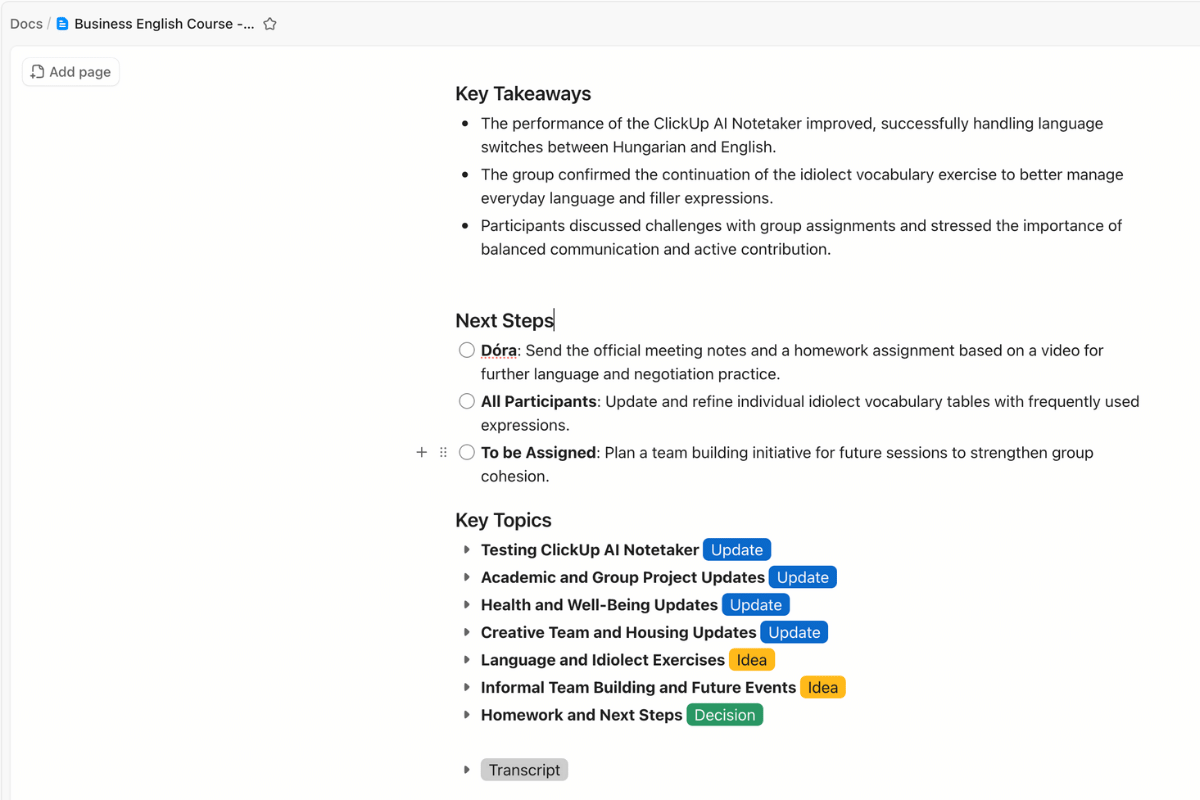
The ClickUp AI package includes the AI notetaker as well, which is already included in paid packages for a limited number of hours, so you don't need to purchase it separately.
A huge advantage is that you can "take it with you" even to Hungarian-language meetings, where it diligently assists.
The ClickUp AI Notetaker can help with the following:
- records the meeting on video,
- transcribes the entire content of the meeting in its original language,
- creates collapsible notes from what was said, specifically marking agenda items, decision points, agreed-upon details, and much more,
- summarizes which meeting participant will have what tasks going forward.
#m1-p#Needless to say, it's one of our favorite features too, as we save hours with it.##
Extra tips for setting up your ClickUp system as a content creator
For ClickUp to truly be an ally in your creative work, establishing the correct structure is important. We've already provided several tips for this in our previous article, where you can freely draw inspiration: Creating an efficient ClickUp workspace: from planning to implementation
Just to mention a few important cornerstones for building an efficient ClickUp workspace:
- Know what you need: before you set anything up, consider what your goal is with ClickUp? Which processes do you want to streamline? What works well, what needs improvement?
- Organization is essential: build your workspace so that everyone can navigate easily, and spaces, folders, and lists are clear.
- Customized views and fields: list, board, calendar, Gantt – choose which one best supports your work. Additionally, with custom fields, you can record all important data needed for tasks.
- Relationships and templates: set up task dependencies, link tasks together, and save your best workflows as templates. This way, recurring tasks can always be completed accurately and quickly.
- Team engagement and onboarding: Remember your teams! Organize your colleagues, provide training and documentation. When everyone knows where to find what, workflows will run much smoother.
Summary: ClickUp as an all-in-one content creation tool
For creative professionals, it is essential to have systems that support their daily work, minimize administrative burdens, and free up as much time as possible for what is truly valuable: genuine creative work.
ClickUp offers all features in one place, whether it's workflow optimization, visual design, templates, checklists, or an AI assistant.
With a well-designed system, content creation will be transparent, efficient, and inspiring, leaving you more time to create, experiment, and enjoy every moment of the creative process. :)
#promobox-en#Do you like ClickUp, but could use a reliable hand to build the perfect system for you? We'd be happy to help!##






.jpg)
.png)