Quote requests by email, applications in PDF, feedback via chat, attendance data in Excel. By the time anything happens with these, the context is already lost, deadlines have slipped, or simply no one truly felt responsible for the next step.
In this article, we explore how ClickUp forms can become the foundation of your company's automations: how a form submission can instantly generate a task, assignee, deadline, follow-up, and report – without micromanagement.
.png)
ClickUp: Company-wide transparency, without micromanagement
In larger organizations, the main challenge is usually not completing tasks, but rather ensuring that management gets a realistic picture of daily operations without micromanagement.
One of ClickUp's greatest advantages is that individual departments (be it HR, sales, marketing, or customer service) can work according to their own logic, while management can still access unified, comparable, and up-to-date data.
The various views (list, board, timeline, calendar…) and automatically updated reports ensure that every role – from employees responsible for operational tasks to senior management – sees exactly what they need.
#m1-p#This eliminates distortion, delays, and nightmare-like "I'll ask about it later" bottlenecks.##
At Selector, we've been organizing our daily work in ClickUp since 2020, and for several years we've also been working as certified ClickUp consultants . We've seen firsthand in both small and large SMEs and multinational environments how a well-structured ClickUp system can become the engine of an entire company.
Let's now look at five areas where a well-designed form can, by itself, initiate a complete, automated business process.
1. Automating Recruitment and HR Processes
In larger SMEs and multinational environments, the complexity of HR processes grows rapidly: recruitment is opened for more and more positions, there are more decision-making levels, and often multiple language areas need to be covered.
The good news is that with ClickUp, recruitment and onboarding can be transformed from a series of ad-hoc tasks into a standardized and measurable process, and even linked with other departments (finance, professional teams, etc.) within a single system.
Automatic categorization of applications submitted via ClickUp forms
ClickUp forms allow "external" users (such as job seekers) to submit data into the system without needing access. Simply place a single, central application form on your careers page, at the end of job postings, or even as part of your internal referral program, and the magic begins.
Incoming applications are automatically converted into tasks and can be categorized based on the provided answers by field, seniority, location, employment type, or any other custom criteria. This way, the candidate database won't get lost in Excel spreadsheets but will be immediately filterable and easy to review.
Sounds good, right? But that's not all!
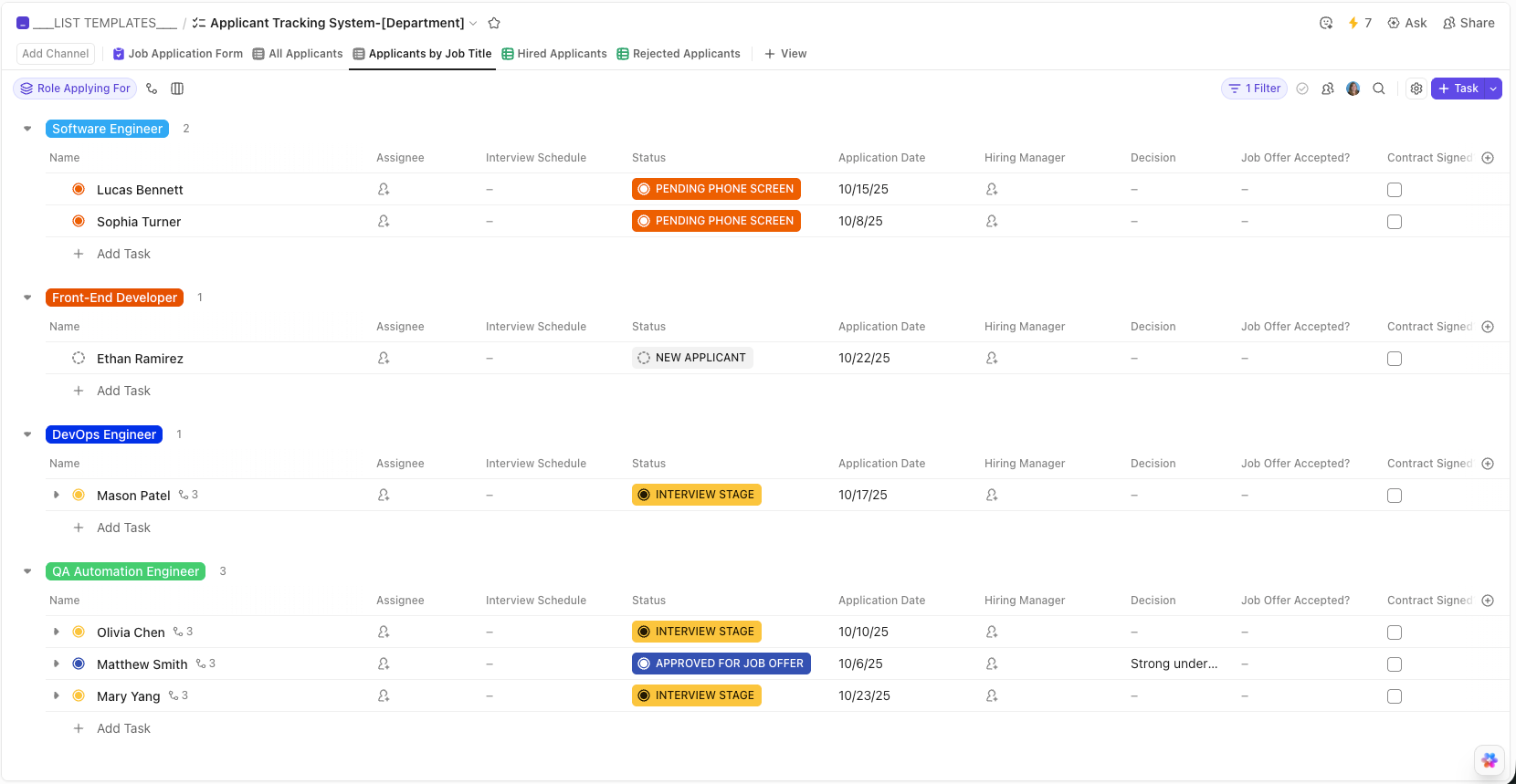
Source: ClickUp template library
Automatic applicant notifications
After applicants have been evaluated, simply change the status of the candidate's task - for example, from "application received"to "phone interview"-, and the system can immediately advance the selection process.
Depending on the company's size and established workflow, a smart HR automation can:
- assign the process to the appropriate HR manager,
- send automatic notifications to the HR department or recruitment lead about further actions,
- or even send an email directly to the applicant with further details.
Importantly, this not only saves time but also ensures a consistent candidate experience – which is now a significant competitive advantage in employer branding.
Onboarding process automation
As a company grows, it becomes increasingly important for every new hire to receive proper training and comprehensive information.
#m1-p#In a large organization, it's no longer easy for a "newbie" to simply roll their office chair from one department head to another if something isn't clear.##
Similarly, it's not ideal if, due to human error or lack of information, half of the new hires don't receive the necessary documents or training materials.
We can prevent this with a with an automatically distributable onboarding task template, which includes all documents, videos to watch, to-do lists, and additional information the new employee needs to be aware of. Plus, this way HR doesn't have to repeatedly sift through and compile every email, task, and guide.
Just as the new hire receives their own onboarding task with their to-dos, the HR professional responsible for their onboarding can also receive a dedicated onboarding task, with pre-defined responsibilities related to the onboarding process – from contract signing to organizing the first meetings.
This entire process can also be automated: the onboarding and induction task template can be automatically generated for both the new colleague and the HR department as soon as an offer is accepted.
This ensures nothing is missed, no emails are forgotten, and the onboarding experience becomes consistent.
2. Automated Sales Process Management
In few areas is a quick response as crucial as in sales: the fate of an incoming quote request often hinges on minutes.
The ClickUp can be integrated with quote request forms on your website, and ClickUp's forms can also be embedded into your company's website, so every incoming inquiry automatically appears as a new task in the system. This can then immediately trigger a pre-defined sales process.
If every quote request is channeled into ClickUp as a separate task, then:
- response times become measurable,
- the status of every offer can be tracked,
- follow-ups can be automated,
- and you get an accurate picture of your sales pipeline's status.
Let's look at a detailed example of automated follow-up below!
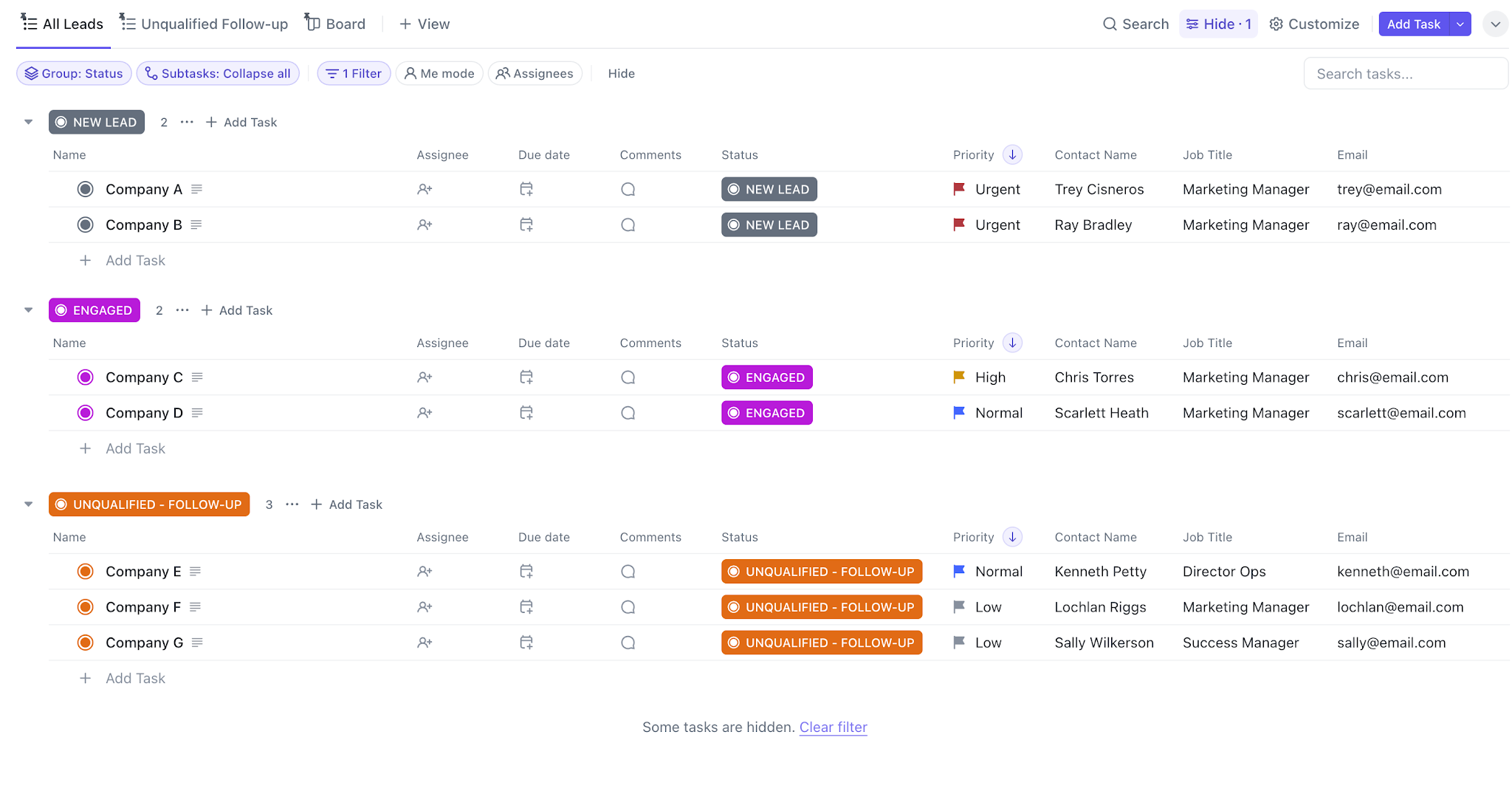
Source: ClickUp Template Library
Automated Follow-up for Quote Requests in ClickUp
Let's say a prospect fills out a quote request form on your website, which might even be created with ClickUp.
In the background, the following process starts automatically:
- A ClickUp task is created in the "Quote Requests" list: it appears as a standalone task in ClickUp, pre-filled with data (company, contact person, service type, deadline). If desired, you can have multiple different quote request lists by area – if there's a field that allows ClickUp to segment requests, you can automate this too, ensuring the new lead's task is created in the right place the moment it arrives.
- Automatic Assignment of Responsibility: the system assigns the appropriate salesperson based on the service type, region, or other collected data, and can even notify them.
- Immediate Confirmation to the Client: the ClickUp automation sends an email to the prospect, confirming receipt and indicating the expected response time.
- Creation of Follow-up Deadlines: subtasks or reminders are automatically added to the task (e.g., "Follow-up in 2 days," "Contact again in 7 days").
- Status-Driven Communication: when the quote's status changes to "sent", another automation is triggered: an internal notification is sent to the sales manager, and a few days later, if the task hasn't progressed, a polite follow-up email is sent to the client.
Naturally, every company's processes are different, and this process can be fully customized at any point.
One thing is certain: with automations like these, the number of lost leads will be significantly reduced (or eliminated), the customer experience will become more consistent, and the work of sales representatives will be made considerably easier. Management can also view statistics related to quote requests on a separate dashboard – for example, which quotes are stalled, or even how much time quote requests spend in each status.
3. Managing and Organizing Customer Service Tickets
If we say "form," many probably think of this area, and for good reason: ClickUp's forms are excellent for customer satisfaction surveys, bug reports, or collecting development suggestions.
Individual reports can be automatically tagged (e.g., based on product/service, urgency, or other parameters), and based on this, it can be decided when they become, for example:
- a web development task,
- a customer service ticket
- or even data supporting a strategic decision.
And if we want even more, with status- and time-dependent automatic reminders we can also ensure quick response times, helping customer service.
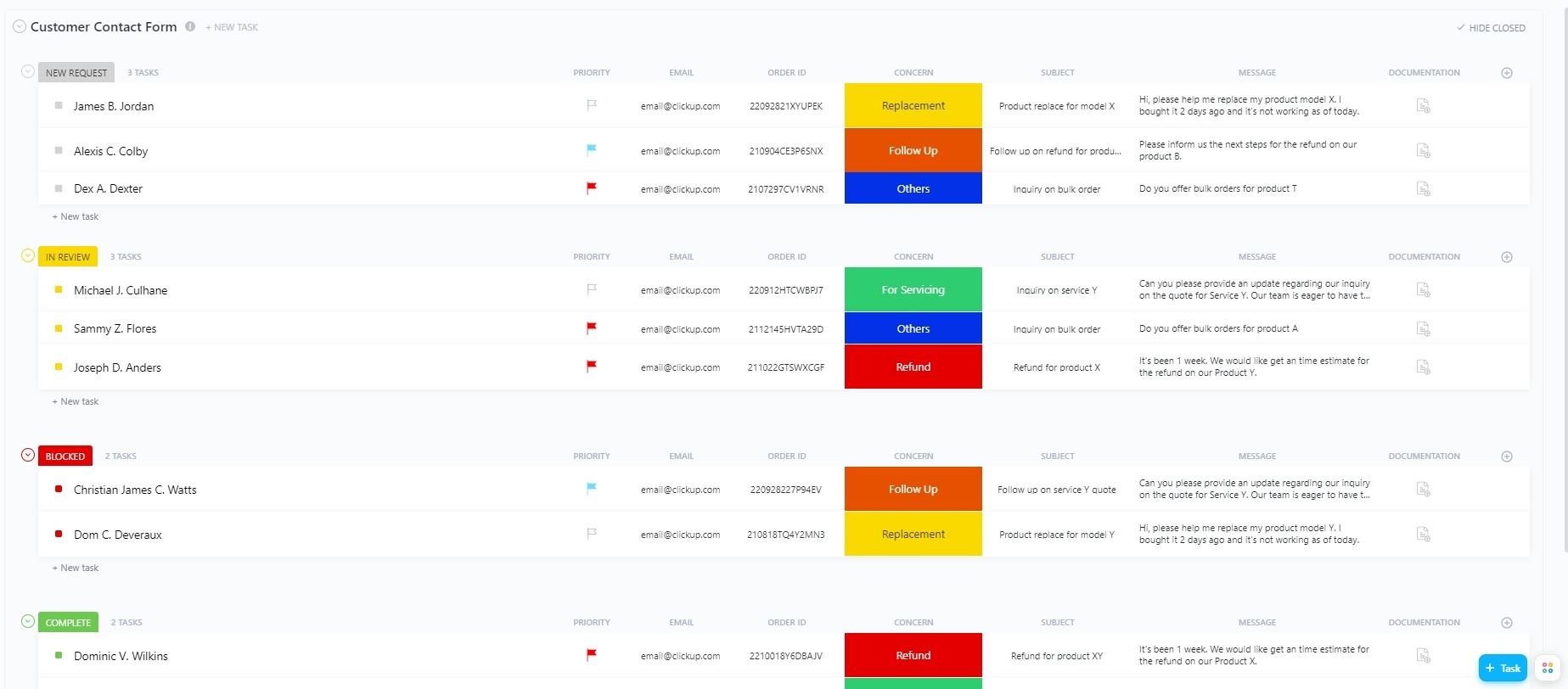
Source: ClickUp template library
Let's look at a practical example again!
Automating the bug reporting process with a ClickUp form
Our starting point should be that by filling out a bug report form, a new task is created in the "Customer Feedback" list, with the provided data (which product version it relates to, problem description, urgency, attached image, etc.).
This can be followed by steps such as:
- Automatic tagging and prioritization: the system tags the task based on the selected fields (e.g., "Product: Webapp", "Type: Bug", "Urgency: High") and assigns a corresponding priority.
- Assigning Responsibility: if it's a technical error, the task is automatically assigned to the web development team; if it's another type of error, it's received by the support team as a customer service ticket.
- Status-Driven Communication: upon reaching "In Progress" or "Under Resolution" status, an automatic email notification can be sent to the customer, providing continuous feedback on the status of their request. Customer service staff can also receive automatic notifications if, for example, a ticket has been waiting in "awaiting resolution" status for several days without an update.
- Requesting Feedback: if we want to integrate customer service evaluations into our customer service process, we can send out an automatic feedback form to customers after every ticket is closed.
If all feedback is visible in one place, generating reports becomes much easier. Based on the system's reports, it becomes clear, among other things, which product receives the most reports, where the proportion of urgent cases is high, and which recurring suggestions warrant product development decisions.
This way, no single report "gets lost" between channels, and feedback doesn't remain isolated complaints but transforms into structured, measurable, and business-interpretable data.
4. Content Management and Creative Processes
ClickUp can also be an ideal system for those working in creative fields: the entire process, from initial brainstorming to publication, can be mapped within it. We've already written in more detail about the most effective tools for this in a previous article: ClickUp Features for Content Creators: How to Make Creative Work More Efficient.
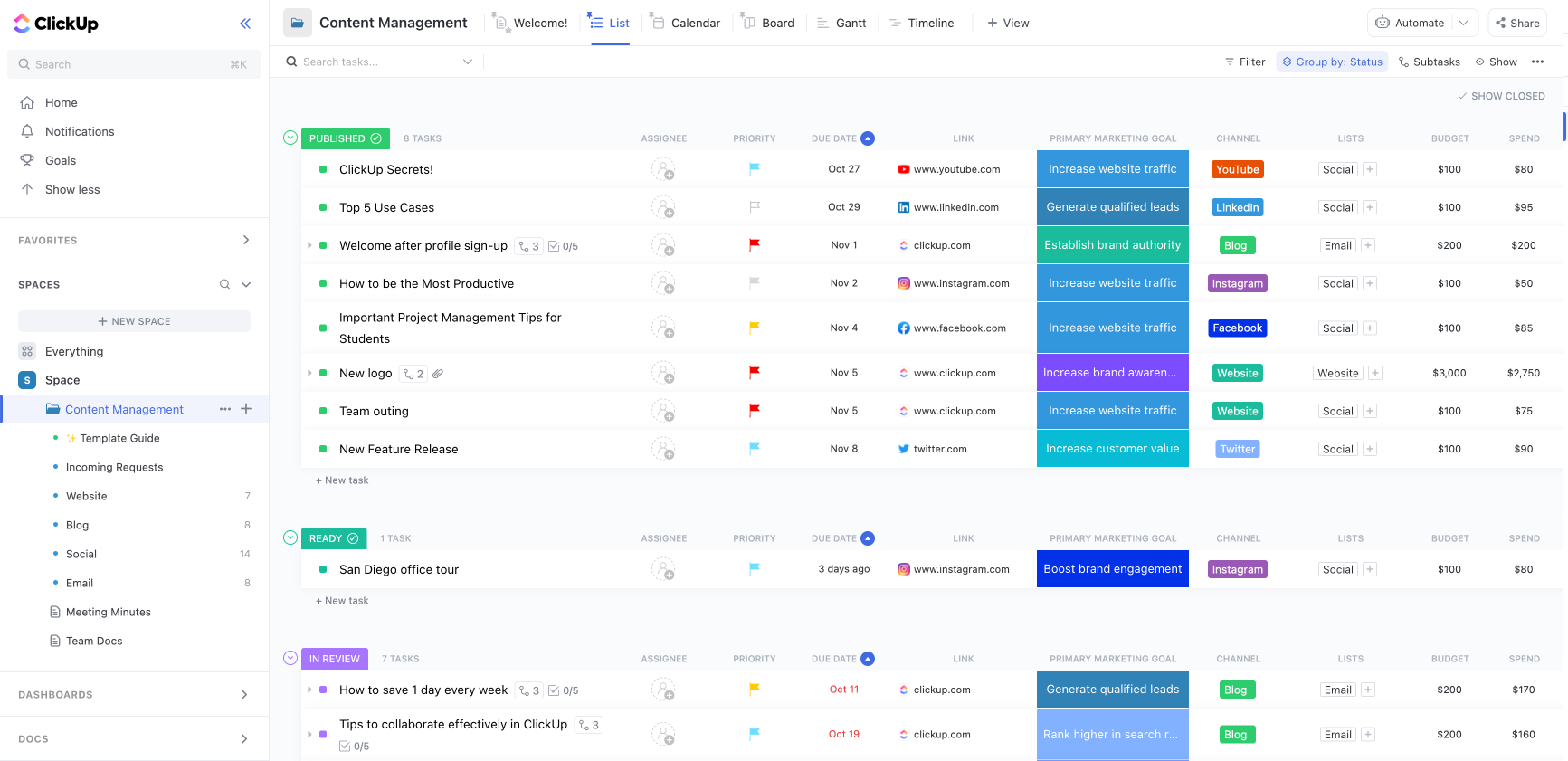
Source: ClickUp Template Library
If ideas currently arrive via email, comments in various documents, and approvals verbally, then it's time to channel these into a single platform.
Let's look at another practical example!
Automated Workflow from Initial Idea to Publication, with ClickUp Forms
Whether we want to provide customers with a sleek interface for their content requests or equip the team with a platform that simplifies administration, ClickUp forms can save many unnecessary rounds of coordination.
Let's assume there is a “Idea Box” form, where either the client or the team can submit their ideas for content to be implemented.
Afterwards, for example, the following workflow can run:
- A content idea is submitted: upon filling out the form, the new content idea enters the ClickUp system as a task, with specific parameters: (target audience, channel, goal, period, etc.)
- Automatic Categorization: the system tags the content based on the answers (e.g., "blog", "social", "newsletter") and places it into the appropriate list (for example, based on the client's name, campaign, deadline, or other parameters).
- Priority Setting: based on a pre-set rule (e.g., related to a specific campaign, short deadline, etc.), the task receives a higher priority.
- Assigning an Owner and Template: based on any parameter (e.g., content type, topic area, etc.), we can automatically assign an owner from the team to the task, and also automatically apply any template to it: for blog articles, a new document can be created on Google Drive; for posts, a publishing checklist can appear, and so on.
- Initiating an Approval Process: if the status changes to "Awaiting Approval", an automatic notification can be sent to the approver, along with a reminder about the publishing deadline.
- Follow-up: after the content has been published, an automatic follow-up message can be sent to the appropriate person after a time period defined by us, requesting a report on its performance.
This is how a simple form can replace lengthy, back-and-forth email exchanges. It's much more elegant – not to mention it helps prevent information from getting lost.
5. Collecting and Organizing Attendance Sheets and Daily Reports
Whether it's daily work reports, training sessions, or workshops, managing attendance sheets in many companies still involves Excel spreadsheets, paper sign-in sheets, or scattered emails.
This is not only an administrative burden but also leads to significant reporting difficulties later: who completed what work, who attended the mandatory training, who was absent, and how many training hours did each employee complete?
In ClickUp, all of this can be managed in a structured way with a single form:
Practical example for managing daily reports with ClickUp forms
Consider, for example, a construction project where multiple specialists work simultaneously at different locations. The question at the end of the day isn't just whether they showed up at the right site according to the schedule, but also precisely what work they completed.
#m1-y#In ClickUp, a simple form that can be filled out from a mobile device allows any team member to record completed tasks in a minute – without needing ClickUp access.##
The submission automatically appears as a task in the relevant project list, complete with pre-structured fields, and can even instantly notify the project manager about the incoming report.
One of the biggest advantages is that photos can also be submitted via the forms. This allows the project manager to monitor progress in real-time, even remotely, without having to personally visit every site or piece together project photos from messages arriving on various platforms.
The data can then be processed automatically: the system can total hours worked and even prepare financial settlements. If a specific work phase reaches a "completed" status, a notification can automatically be sent to the technical inspector or the next specialized team.
This way, daily work reports become an integral, transparent, and searchable part of project management, rather than just paper-based administration.
Summary: Forms as the perfect starting point for automations
One of ClickUp's most powerful, yet often underestimated features, is the form.
Many don't see them as the starting point for most automated processes – yet forms allow us to populate our databases with valuable new information, in a structure we define, traceably, and with specific (even automatic) task assignments. Whether it's for applications, quote requests, feedback, or internal administration, forms can standardize and accelerate data entry, reduce tedious administrative burdens, and ensure that all processes begin with the same logic.
ClickUp can therefore be more than just your reliable task manager; it can be a central system where automations kick in from the very first click, supporting your team's work. :)
#promobox-en#Would you welcome the help of an experienced team to automate your business processes? We'd be happy to assist!##






.jpg)
.png)