
Anyone who has browsed the internet has surely encountered the phenomenon where, driven by the desire to search, they look up a specific phrase, results appear in a row, they happily click on what seems to be the best one, and then emptiness appears on their screen. "This isn't what we were looking for. Oh no!" exclaims the frustrated searcher to themselves, having already lost a few minutes of their valuable time, which is quite frustrating. They immediately click away and continue to search and browse, looking for a usable result. Soon, we will also discuss what happens on the other side, within the complex and intricate system of search engines. But first, let's clarify what we're talking about!
.png)
What is a 404 error?
According to the 404 HTTP error code, the server cannot find the requested content, meaning the user is trying to access a webpage that does not exist.
The most common reason is a page that no longer exists, but an incorrectly entered URL can also be the culprit. Although the browser successfully communicates with the server, the server cannot fulfill the request because the requested page is not found.
Soft and Hard 404 Errors
Primarily, the status code returned by the server determines whether a 404 error is hard or soft. A 404 error is soft when the server indicates a 200 HTTP status code, meaning an accessible page, but actually displays erroneous content to the user.
Why is this a problem? The 200 status code misleadingly indicates to search engine bots that the page exists, but in reality, it contains no meaningful content, causing them to waste unnecessary resources on these URLs during their crawling process.
In the case of a hard 404 error, the server correctly returns the 404 HTTP status code, and users are directed to an actual error page. This is essentially the correct way to handle non-existent or discontinued pages.
Why does the 404 error code appear, and who is responsible for it?
A 404 error can arise due to various user-side or website-side issues. For example, if we have to type an URL into the search bar, given that fewer and fewer people can type accurately, and these URL addresses are often quite complex, there's a good chance we'll make a typo. Immediately, you have a faulty URL and a page that doesn't exist.
It's also common for another website to link to our page incorrectly, leading to a 404 error. In such cases, the occurrence of a 404 error doesn't depend on our own website but on external sources, such as the user or another website. However, it can happen that we typed the URL correctly, or clicked a link without any chance of error, yet still receive an empty page instead of the expected one. In this scenario, a subpage was either deleted or moved without a 301 redirect being implemented. There are also 404 errors that users might not encounter, but search engine bots detect. These are attributable to website errors.

Why should 404 errors be addressed?
The introduction already revealed how a user might feel when a search engine wastes their time with pages that don't even exist.
We can encounter a 404 page not only from a direct link but also while navigating within a specific site. Let's say we're looking for a particular product in an online store. A category page that looks quite promising for our search appears in the menu, but upon clicking it, there's nothing there. We continue clicking around the store, but if this happens frequently, we lose trust in the store. We quickly move on if clicks don't yield results. We'll likely avoid this site in the future and try a competitor's website instead, even if the site "comes up" in our browser.
Let's see how our above reaction will affect SEO!
It is becoming increasingly clear how important a ranking factor user behavior. The search engine precisely detects when and where a user clicks, and also how much time they spend there. While Google states that individual 404 errors will not directly harm a page's SEO, a large number of broken links can pose a problem.
#promobox-szolg-seo-en#Do you feel it's better to entrust your website's search engine optimization to experts?##
Let's not forget that the browser isn't trying to annoy us, but to serve us as best as possible so we use it more. The search engine interprets bounce rate, which is when a user leaves immediately after clicking a link. Bounce rate is an important signal for search engines, indicating that the content didn't meet the search query, meaning it shouldn't recommend this page often. What will it do then? It will rank it lower.
Furthermore, these pages are undesirable from a technical standpoint. Indexing can be hindered by them, as 404 errors prevent robots from fully crawling the site, which can weaken the website's visibility.
We can also lose valuable link equity because of 404 pages. If an external link points to a non-existent 404 page, the link equity from that external link is lost. Just consider how difficult it can be to acquire links to our site, so it's understandable what a significant loss it can be to waste valuable links in this manner.
Based on the above, we can conclude that while a single 404 page might not cause issues, a larger number can harm the site's SEO performance, making it advisable to identify and resolve the problem.
How to find 404 pages?
Fortunately, several useful tools are available for identifying such errors:
Google Search Console
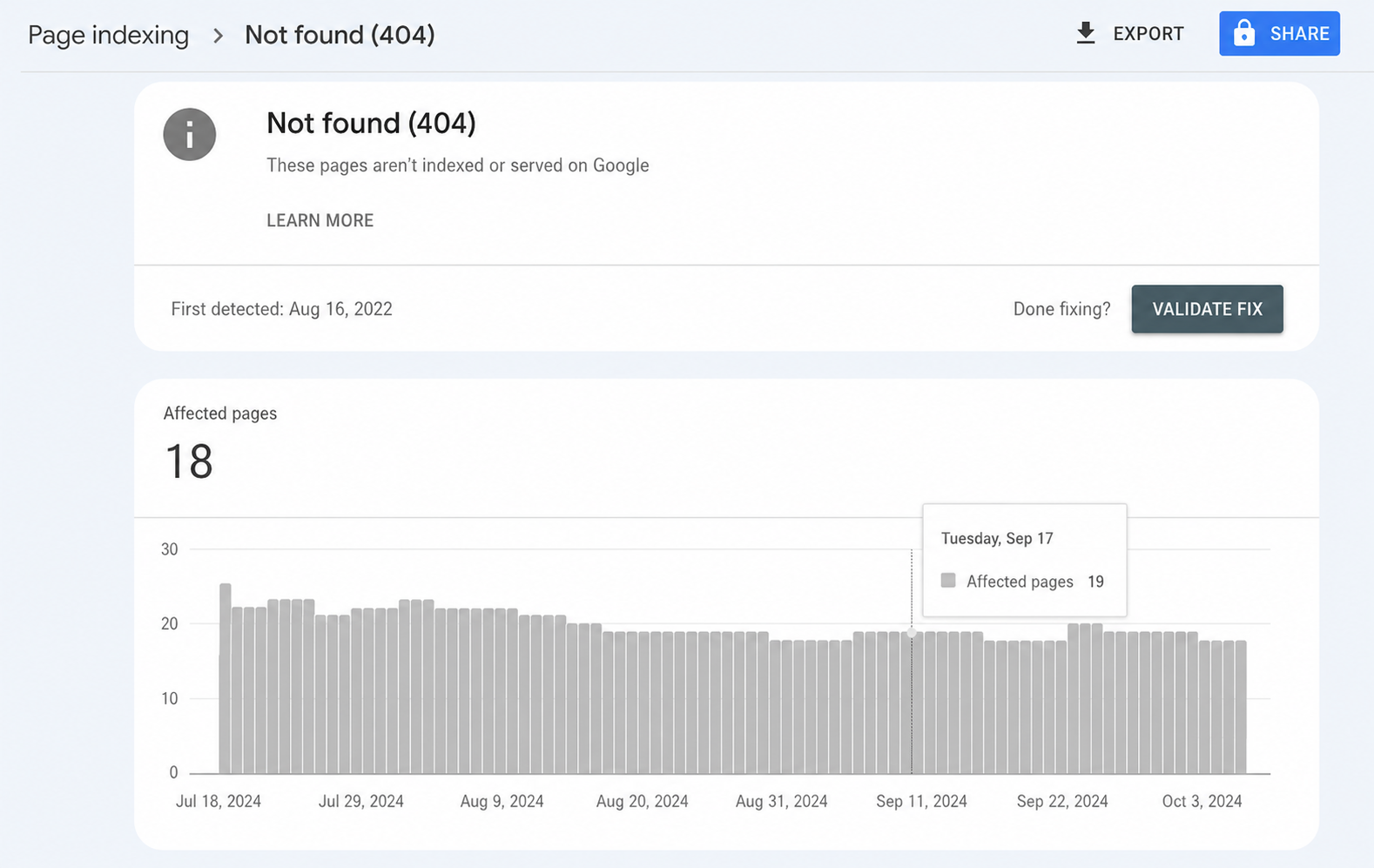
Google Search Console is a fundamental tool for every webmaster, so perhaps everyone with a website is familiar with it. It allows us to filter out which pages generate 404 errors, easily view a list of faulty URLs, and quickly take steps to fix them.
Screaming Frog
Screaming Frog is another excellent tool that allows you to find 404 errors on a website. Since it can handle thousands of pages at once, it's also suitable for larger websites, though only in its paid version.
Ahrefs
My personal favorite is the Ahrefs SEO tool, which among other things helps track external links and broken references. Even the free version is excellent for quickly and massively identifying 404 errors, and can also be very useful for a range of technical SEO analyses.
How to fix 404 errors?
Once you have the list of 404 pages, the only remaining task is to fix them. This part is undoubtedly the more time-consuming, as you'll need to evaluate each URL individually and address its resolution, which can be a significant undertaking for hundreds of pages.
First, it's worth identifying whether the 404 page generates any traffic. The Search Console tool is perfectly adequate for this purpose.
If the page generates traffic, our goal is to preserve that traffic. Therefore, the best way to fix it is with a 301 redirect to a similar, but functional page. It's important to redirect to a page whose content isn't significantly different and can answer the same question. This way, the user won't experience the frustration of landing on an empty page and can also find an answer to their query.
#promobox-newsletter###
If a page doesn't generate traffic, there's no absolute need for redirection, but these pages should be removed from the sitemap.
Also examine whether the 404 page has received any external or internal links. If the page has received valuable external links, it's still worth the effort to redirect it. If an internal link points to it, definitely redirect it or consider restoring the original page.
What can a user do if they encounter a 404 error?
Instead of getting frustrated, users encountering a 404 error can check with a few simple steps whether the error is temporary or permanent. In many cases, refreshing the page, checking the URL, or clearing cookies can provide a solution.
How to turn a disadvantage into an advantage?
For a larger website, managing all 404 pages is almost impossible, as the site's content is constantly changing. We can even turn errors to our advantage with creative solutions. A well-designed custom 404 page can help keep users on the site. We can guide visitors back to the right path without them leaving the site frustrated.
We can display interesting graphics or humorous messages that explain the error and offer further options. It can also be useful to include a search bar, contact information, or links to the most popular pages.

How to prevent 404 errors?
Prevention can be key. Here are some best practices to minimize the occurrence of errors:
- Regularly check the website's functionality with appropriate SEO tools so that we can quickly react to emerging errors.
- If a page is removed or moved, make sure to use a 301 redirect to the new location.
- Ensure that our sitemap is always up-to-date to avoid broken links.
404 errors are unavoidable, especially for larger or older websites, but by managing them effectively, we can minimize negative impacts. Whether it's about redirects, creating custom 404 pages, or quickly fixing 404 errors, all of this contributes to a better user experience and thus improves search engine perception.
#promobox-en#Do you need help with your website's search engine optimization? Or do you simply want to entrust SEO to professionals?##
-min.png)





.jpg)
.png)