
Many are just discovering it, yet it's been around for a long time and is no longer a secret weapon: a customer list is one of the most accurate and effective remarketing tools you can use on platforms like Google, Meta, or LinkedIn. If you already have a customer database, it's high time you didn't just store the data, but also harnessed its power!
In this article, we'll explore all the benefits of a customer list, how to build one, how to upload it to various platforms, and the most common pitfalls to avoid.
.png)
First off: what is a customer list?
Simply put, it's a list containing people (or companies) with whom you've already had some kind of contact. This could be a prospect, a past customer or even a user requesting a demo.
#m1-y#The common thread: they already know you, so they are much more likely to respond to a new offer if you target them directly.##
A customer list can contain data such as:
- email addresses
- phone numbers
- company names
- demographic data (e.g., city, zip code, etc.)
What can you use a customer list for?
The range of possibilities is surprisingly wide: a well-structured customer list can be a real goldmine for your company in terms of online marketing – and thus revenue growth.
Here are a few examples:
- Newsletters: If your list is GDPR-compliant (e.g., created through opt-in), you can easily send targeted emails. Just think of personalized offers, exclusive news, or promotions.
- Remarketing campaigns: Google, Meta, and LinkedIn all allow you to target customers from your uploaded customer lists with tailored ads that encourage them to make contact, purchase, or take other actions beneficial to your business.
- Building Lookalike Audiences: The algorithm finds users who most closely resemble your existing customers. This can also be invaluable if you're looking for new buyers.
- Exclusions: Related to the point above – if you want to attract new leads, you can easily exclude your existing customers based on your customer list. This ensures your ads only reach those you intend to target, preventing wasted ad spend.

From Platform to Platform – How to Do It Right
Google Ads Customer List
Are you familiar with the situation where your Google Ads campaigns generate clicks, but you feel like those who have already shown interest are slipping away?
They visited your website, perhaps even added something to their cart, or subscribed to your newsletter… then disappeared. Yet, maybe all they need is a little reminder to come back. This is exactly where customer lists can help – ensuring you don't lose those you've already engaged.
At first, it might seem a bit technical: uploading a .csv list, setting up targeting correctly, and of course, GDPR is always a consideration.
But there's no need to worry – we'll show you step-by-step how to create an effective customer list for your campaigns.
Where and how can you upload it?
Within the Google Ads interface, go to the Tools menu item, then under the Shared library menu item, select the Audience Manager option.
The Your data segments section allows you to create various remarketing lists by clicking the blue plus sign. From here, we now need to click on the Customer list menu item.
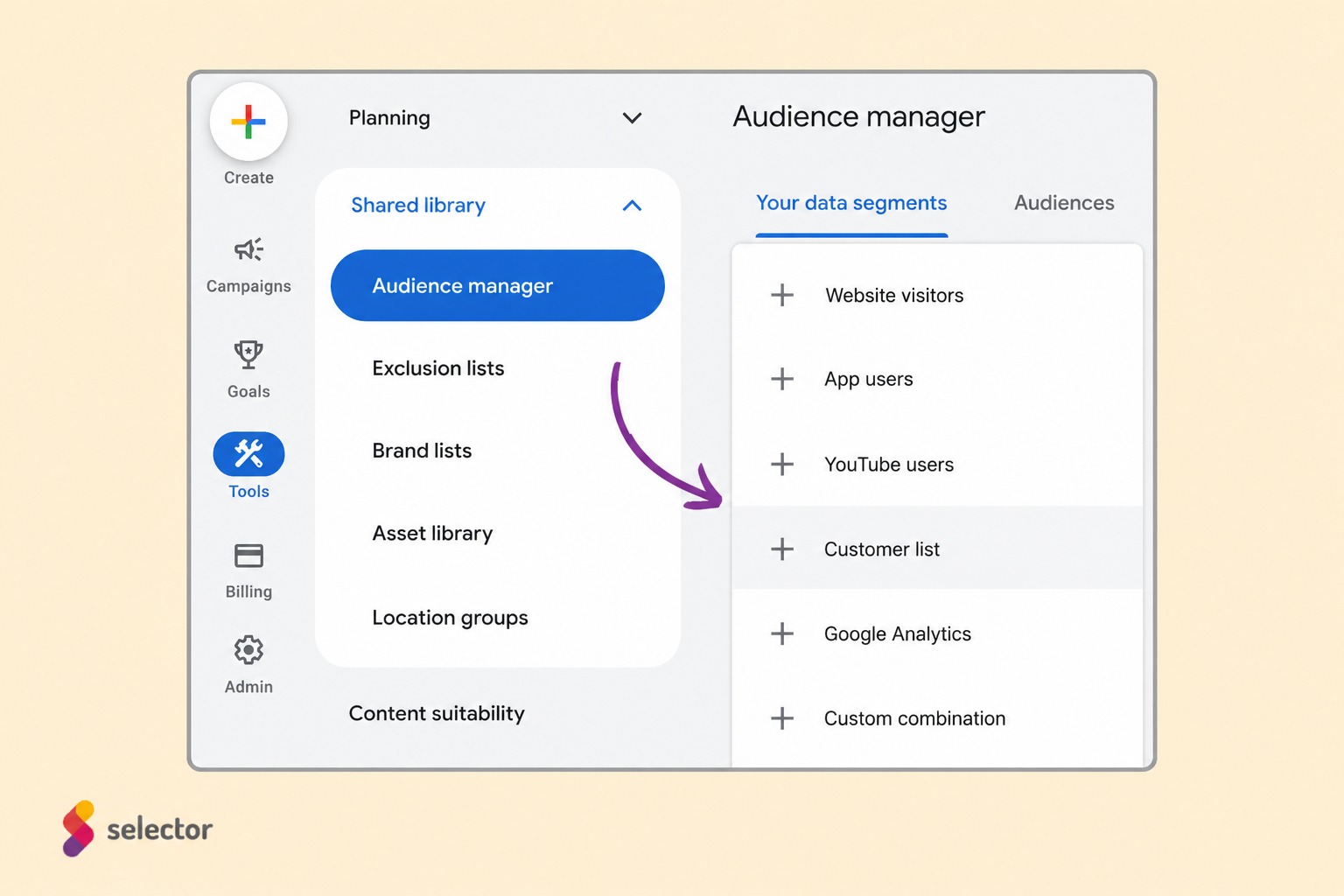
After this, you can provide the data in three ways:
- linking a new data source
- manual file upload
- or you can even skip this step, according to Google Ads, and set up the data source later… :)
Let's take a closer look at what you should know about data source-based and manual uploads!
Uploading a Google Ads customer list from a new data source
If a new data source is what you want to link, Google Ads offers software like Shopify, Zapier or Salesforce, but many other third-party product integrations can also be selected.
Google Ads customer list upload from a file
When manually uploading the file, however, several things need to be considered. First, for the data type you want to upload, you must select the appropriate one, which can be:
- uploading email addresses, phone numbers, and/or mailing addresses,
- uploading user IDs,
- or uploading mobile device IDs.
For email addresses, phone numbers, and/or mailing addresses, correct formatting is very important — Google Ads has specific formatting guidelines for this.
First and foremost, only CSV files can be uploaded. To upload the data, you can use the Google Ads template or create a file individually.
If you create the CSV file for your customer list manually, then the column headers must be named in English, as follows: Email, Phone, First Name, Last Name, Country, and Zip.
The membership duration for customer match lists is a maximum of 540 days . To maintain eligibility, at least 100 members must be added or updated on the list within the last 540 days.
In practice, this means that Google checks how fresh your list is. If within 540 days (or about a year and a half) at least 100 new or updated users are not added to the list, then that list may become inactive, and you won't be able to use it for targeting in your ads.
The "update" in this case, could also mean that a you supplement an existing email address with new fields (e.g., name or zip code), or you modify the data. So it doesn't necessarily have to be a new user; it's enough for the data to appear as new in the system. This is especially important if you plan to advertise long-term using the list.
What are the potential pitfalls of Google Ads customer lists?
There's a catch...
#m1-y#Google Ads customer match lists cannot be used immediately.##
We must meet the following conditions for our customer list to be usable:
- comply with Google Ads policies
- at least 90 days of using Google Ads services
- a total spend of more than 50,000 USD, or approximately 17.5 million HUF must be spent in our Google Ads account.
However, even if we meet all criteria, it's still not guaranteed that our customer list will be usable.
After we upload our file, Google Ads reviews it and determines a match rate, so it's far from certain that all users on our list will be retargetable.
Furthermore, even with a high match rate, we might still encounter issues. If our list size is under 1,000 users, the audience will be too small to be shown on either the Display or Search Network.
So, how can we avoid these pitfalls?
Here are a few things to keep in mind:
- Use accurate, up-to-date data: avoid typos and missing fields.
- Use the format recommended by Google (e.g., CSV, with appropriate column names, and a consistent phone number format).
- Provide as many data fields as possible (e.g., name, zip code, country), as this can improve the match rate.
- Aim for the largest possible audience size so the system can effectively work with it.
Summary of Google Ads Customer Lists
While using Google Ads customer lists isn't always straightforward and can involve numerous technical, data privacy, and management challenges, as a marketing agency, we highly recommend them to anyone serious about targeted marketing.
Customer lists allow you to more precisely target your existing customers, increase conversions, and optimize your advertising budget.Additionally, by building lookalike audiences, you can find new, relevant customers,which can provide a long-term competitive advantage.
Overall, using customer lists can significantly improve your campaigns' effectiveness and ROI, so the time and effort invested are well worth the initial challenges. :)
Meta (Facebook, Instagram) Customer Lists
Meta – the system that now manages Facebook and Instagram ads – also supports the use of customer lists, and even offers one of the most flexible solutions. in this area.
Furthermore, it's an excellent environment for customer list ads. Think about it: someone has already visited you, shown interest, or just missed out on an offer – why not reappear to them, this time in their favorite social media feed?
Meta's system also allows you to target these people based on your own database, and even, you can reach those who are very similar to them (hello, lookalike audience!).
The process of uploading a customer list is relatively simple – but it's worth paying special attention to a few things to achieve the best possible results.
#promobox-newsletter###
Where and how can you upload a Meta customer list?
On the Meta platform (in the Ads Manager or the Business Manager), find the Audiences menu item, then select the Create New Audience option, and within that, the Custom Audience.
%20u%CC%88gyfe%CC%81llista%20felto%CC%88lte%CC%81se.png)
A pop-up window will appear here, offering several options – for our purposes, we'll need the Customer List option. In the next pop-up window, Meta briefly summarizes the requirements for the customer list. This is actually a genuinely useful summary, so if you're using this feature for the first time, it's worth reading.
You can choose from two main methods for uploading:
- Mailchimp integration, if you use it for sending newsletters (this is the faster, automated solution),
- or a .csv or .txt file upload, if you're working from another system or compiling the data manually.
What should the file contain?
For Meta to be able to identify users, at least one primary identifier must be included in the file.
For example, this could be:
- the email address,
- phone number,
- first name,
- last name,
- Facebook app user ID,
- Facebook page user ID,
- or the mobile advertiser ID.
#m1-y#Important: The file must contain at least 100 users. A list smaller than this cannot be used for advertising purposes.##
The more detailed your customer list is, the higher the chance of building a usable audience from it.
If you want to improve the match rate, meaning that Meta can more accurately find users in its system, then it's worth including additional data. For example, these may include the following:
- city
- zip code
- country
- gender
What happens after uploading the Meta customer list?
If all data is in order, Meta processes the file in an encrypted (hashed) format . This is important for data privacy, so the information cannot be decrypted and will not fall into the wrong hands.
The system then analyzes the file, looks for matches, then creates the audience associated with the customer list.
#m1-p#Good news: if the upload is successful, you can use the list almost immediately.##
What can you use the Meta customer list for?
On the Meta platform, you have several options:
- For remarketing campaigns:
You can re-engage those who have previously interacted with you, for example, by making a purchase or subscribing to your newsletter. - For creating a lookalike audience:
Meta's algorithm searches for users similar to those on your customer list, allowing you to reach new, yet likely relevant, individuals. - For exclusion targeting:
If a campaign is specifically for new customers, you can easily exclude your existing buyers.
LinkedIn Customer Lists (Contact List and Company List)
LinkedIn is primarily a B2B platform, so it's no surprise that it also offers unique opportunities for this type of targeting:
On LinkedIn, in addition to the classic contact list , you can also upload a company list , allowing you to target specific companies in your campaigns.
If In LinkedIn campaigns you're considering, depending on your target audience, it's definitely worth using at least one or even both in combination, as they enable much more effective advertising.
You can upload both types of lists within the LinkedIn Campaign Manager. Let's take a detailed look at how they work and what to keep in mind to get the most out of them!
Creating a LinkedIn Company List - for targeting companies
The company list allows you to target specific companies within your campaigns, whether they are potential partners, suppliers, or even competitors.
However, LinkedIn can only accurately identify companies if it has sufficient data.
You must provide at least one of the following data points for each company:
- company name
- company website
- LinkedIn page URL
- stock symbol (if it's a publicly traded company)
Additionally, there are further recommended fields for more accurate matching:
- city
- country
- postal code
- industry
#m2-y#Tip: It is advisable to include at least 1,000 companies on the list, as the system will only allow the use of the target audience if it recognizes at least 300 companies from it.##
The upload can only be done in .csv file format . LinkedIn also provides a template for compiling the file – it is worth using this to ensure the column headers are correct.
It is important to know that processing the list is not immediate, it can take up to 48 hours, for the system to find matches and for your target audience to be activated.
Compiling a LinkedIn contact list - for targeting individual users
The contact list is most similar to a classic customer list. By using it, you can directly reach people on LinkedIn with whom you already have a connection, such as customers or past leads.
Similar to the company list, the system will only allow the list to be used as a target audience if it has successfully matched at least 300 users on the platform. For this, it is typically advisable to upload a minimum of 10,000 email addresses – this is the quantity from which the required 300 matches will result.
For the contact list (customer list), it is advisable to provide the following fields:
- email address
- First name
- Last name
However, it's also true that the more data you have, the more accurately LinkedIn can match users.
Where and how to upload LinkedIn customer lists (company lists and contact lists)?
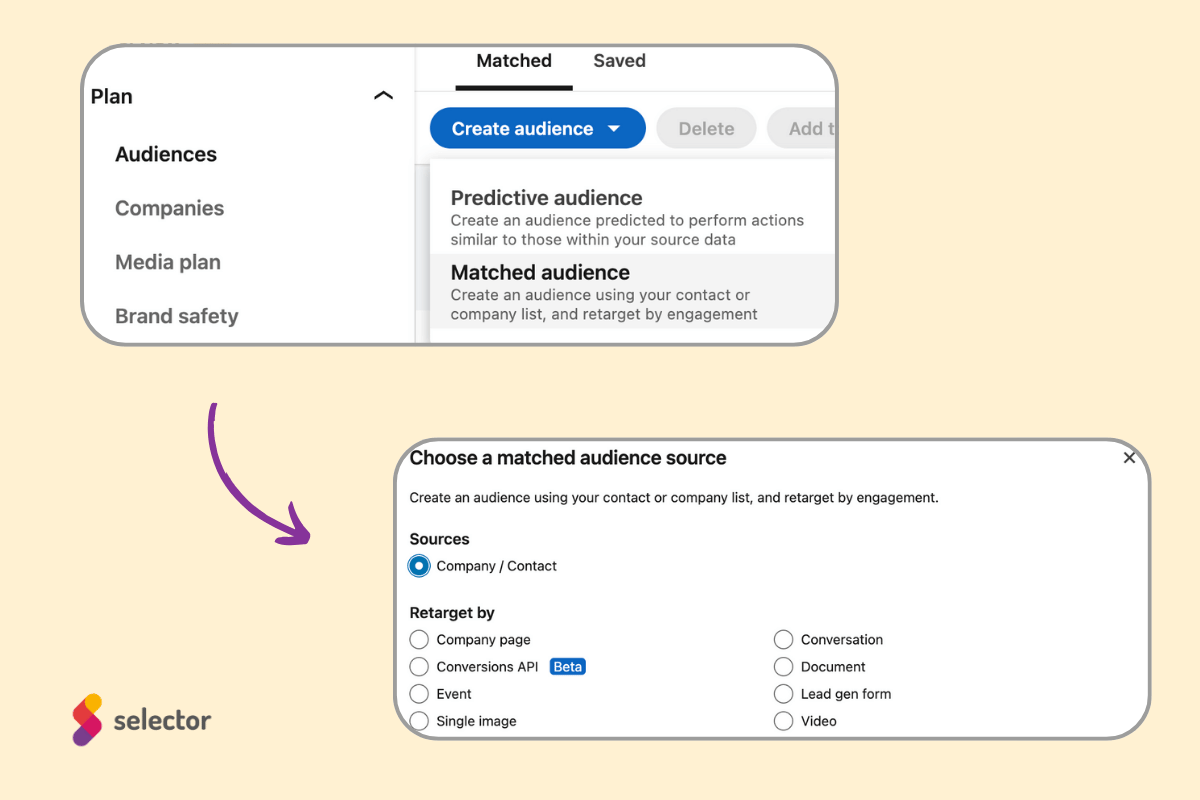
To upload contact and company lists, navigate to Campaign Manager within its interface, through the following menu items to the relevant section of the Audience Manager:
Plan → Audiences → Create audience → Matched audience
Here you can choose whether to upload a company or contact list, and once that's done, you can start the upload process.
Summary
Customer lists are not just databases; they are truly key tools for effective and cost-conscious online campaigns. Whether you want to re-engage previous leads or build new, similar target audiences, customer lists allow you to run more personalized, relevant ads.
Whether it's Google, Meta, or LinkedIn, every platform has its own technical requirements, but they all have one thing in common: a well-compiled list is worth its weight in gold. If you haven't yet taken advantage of these opportunities, it's worth diving in – even if they seem complicated or too time-consuming at first.
The next step is up to you. Don't just collect data; use it wisely!
#promobox-en#Need a little help with customer lists or ad management in general? Get in touch with us!##






.jpg)
.png)